

Reference documentation and code samples for the Google Apps Chat V1 Client class ChatServiceClient.
Service Description: Enables developers to build Chat apps and integrations on Google Chat Platform.
This class provides the ability to make remote calls to the backing service through method calls that map to API methods.
Many parameters require resource names to be formatted in a particular way. To assist with these names, this class includes a format method for each type of name, and additionally a parseName method to extract the individual identifiers contained within formatted names that are returned by the API.
Namespace
Google \ Apps \ Chat \ V1 \ ClientMethods
__construct
Constructor.
| Parameters | |
|---|---|
| Name | Description |
options |
array|Google\ApiCore\Options\ClientOptions
Optional. Options for configuring the service API wrapper. |
↳ apiEndpoint |
string
The address of the API remote host. May optionally include the port, formatted as "
|
↳ credentials |
Google\Auth\FetchAuthTokenInterface|Google\ApiCore\CredentialsWrapper
This option should only be used with a pre-constructed Google\Auth\FetchAuthTokenInterface or Google\ApiCore\CredentialsWrapper object. Note that when one of these objects are provided, any settings in $credentialsConfig will be ignored. Important: If you are providing a path to a credentials file, or a decoded credentials file as a PHP array, this usage is now DEPRECATED. Providing an unvalidated credential configuration to Google APIs can compromise the security of your systems and data. It is recommended to create the credentials explicitly |
↳ credentialsConfig |
array
Options used to configure credentials, including auth token caching, for the client. For a full list of supporting configuration options, see Google\ApiCore\CredentialsWrapper::build() . |
↳ disableRetries |
bool
Determines whether or not retries defined by the client configuration should be disabled. Defaults to |
↳ clientConfig |
string|array
Client method configuration, including retry settings. This option can be either a path to a JSON file, or a PHP array containing the decoded JSON data. By default this settings points to the default client config file, which is provided in the resources folder. |
↳ transport |
string|Google\ApiCore\Transport\TransportInterface
The transport used for executing network requests. May be either the string |
↳ transportConfig |
array
Configuration options that will be used to construct the transport. Options for each supported transport type should be passed in a key for that transport. For example: $transportConfig = [ 'grpc' => [...], 'rest' => [...], ]; See the Google\ApiCore\Transport\GrpcTransport::build() and Google\ApiCore\Transport\RestTransport::build() methods for the supported options. |
↳ clientCertSource |
callable
A callable which returns the client cert as a string. This can be used to provide a certificate and private key to the transport layer for mTLS. |
↳ logger |
false|Psr\Log\LoggerInterface
A PSR-3 compliant logger. If set to false, logging is disabled, ignoring the 'GOOGLE_SDK_PHP_LOGGING' environment flag |
↳ universeDomain |
string
The service domain for the client. Defaults to 'googleapis.com'. |
completeImportSpace
Completes the import process for the specified space and makes it visible to users.
Requires user authentication and domain-wide delegation with the authorization scope:
https://www.googleapis.com/auth/chat.import
For more information, see Authorize Google Chat apps to import data.
The async variant is ChatServiceClient::completeImportSpaceAsync() .
| Parameters | |
|---|---|
| Name | Description |
request |
Google\Apps\Chat\V1\CompleteImportSpaceRequest
A request to house fields associated with the call. |
callOptions |
array
Optional. |
↳ retrySettings |
Google\ApiCore\RetrySettings|array
Retry settings to use for this call. Can be a Google\ApiCore\RetrySettings object, or an associative array of retry settings parameters. See the documentation on Google\ApiCore\RetrySettings for example usage. |
| Returns | |
|---|---|
| Type | Description |
Google\Apps\Chat\V1\CompleteImportSpaceResponse |
|
use Google\ApiCore\ApiException;
use Google\Apps\Chat\V1\Client\ChatServiceClient;
use Google\Apps\Chat\V1\CompleteImportSpaceRequest;
use Google\Apps\Chat\V1\CompleteImportSpaceResponse;

/**
 * @param string $formattedName Resource name of the import mode space.
 *
 *                              Format: `spaces/{space}`
 *                              Please see {@see ChatServiceClient::spaceName()} for help formatting this field.
 */
function complete_import_space_sample(string $formattedName): void
{
    // Create a client.
    $chatServiceClient = new ChatServiceClient();

    // Prepare the request message.
    $request = (new CompleteImportSpaceRequest())
        ->setName($formattedName);

    // Call the API and handle any network failures.
    try {
        /** @var CompleteImportSpaceResponse $response */
        $response = $chatServiceClient->completeImportSpace($request);
        printf('Response data: %s' . PHP_EOL, $response->serializeToJsonString());
    } catch (ApiException $ex) {
        printf('Call failed with message: %s' . PHP_EOL, $ex->getMessage());
    }
}

/**
 * Helper to execute the sample.
 *
 * This sample has been automatically generated and should be regarded as a code
 * template only. It will require modifications to work:
 *  - It may require correct/in-range values for request initialization.
 *  - It may require specifying regional endpoints when creating the service client,
 *    please see the apiEndpoint client configuration option for more details.
 */
function callSample(): void
{
    $formattedName = ChatServiceClient::spaceName('[SPACE]');

    complete_import_space_sample($formattedName);
}
createCustomEmoji
Creates a custom emoji.
Custom emojis are only available for Google Workspace accounts, and the administrator must turn custom emojis on for the organization. For more information, see Learn about custom emojis in Google Chat and Manage custom emoji permissions.
Requires user authentication with the authorization scope:
https://www.googleapis.com/auth/chat.customemojis
The async variant is ChatServiceClient::createCustomEmojiAsync() .
| Parameters | |
|---|---|
| Name | Description |
request |
Google\Apps\Chat\V1\CreateCustomEmojiRequest
A request to house fields associated with the call. |
callOptions |
array
Optional. |
↳ retrySettings |
Google\ApiCore\RetrySettings|array
Retry settings to use for this call. Can be a Google\ApiCore\RetrySettings object, or an associative array of retry settings parameters. See the documentation on Google\ApiCore\RetrySettings for example usage. |
| Returns | |
|---|---|
| Type | Description |
Google\Apps\Chat\V1\CustomEmoji |
|
use Google\ApiCore\ApiException;
use Google\Apps\Chat\V1\Client\ChatServiceClient;
use Google\Apps\Chat\V1\CreateCustomEmojiRequest;
use Google\Apps\Chat\V1\CustomEmoji;

/**
 * This sample has been automatically generated and should be regarded as a code
 * template only. It will require modifications to work:
 *  - It may require correct/in-range values for request initialization.
 *  - It may require specifying regional endpoints when creating the service client,
 *    please see the apiEndpoint client configuration option for more details.
 */
function create_custom_emoji_sample(): void
{
    // Create a client.
    $chatServiceClient = new ChatServiceClient();

    // Prepare the request message.
    $customEmoji = new CustomEmoji();
    $request = (new CreateCustomEmojiRequest())
        ->setCustomEmoji($customEmoji);

    // Call the API and handle any network failures.
    try {
        /** @var CustomEmoji $response */
        $response = $chatServiceClient->createCustomEmoji($request);
        printf('Response data: %s' . PHP_EOL, $response->serializeToJsonString());
    } catch (ApiException $ex) {
        printf('Call failed with message: %s' . PHP_EOL, $ex->getMessage());
    }
}
createMembership
Creates a membership for the calling Chat app, a user, or a Google Group.
Creating memberships for other Chat apps isn't supported. When creating a membership, if the specified member has their auto-accept policy turned off, then they're invited, and must accept the space invitation before joining. Otherwise, creating a membership adds the member directly to the specified space.
Supports the following types of authentication:
- App authentication with administrator approval and the authorization scope:
https://www.googleapis.com/auth/chat.app.membershipsUser authentication with one of the following authorization scopes:
https://www.googleapis.com/auth/chat.membershipshttps://www.googleapis.com/auth/chat.memberships.app(to add the calling app to the space)https://www.googleapis.com/auth/chat.import(import mode spaces only)- User authentication grants administrator privileges when an
administrator account authenticates,
use_admin_accessistrue, and the following authorization scope is used: https://www.googleapis.com/auth/chat.admin.memberships
App authentication is not supported for the following use cases:
- Inviting users external to the Workspace organization that owns the space.
- Adding a Google Group to a space.
- Adding a Chat app to a space.
For example usage, see:
- Invite or add a user to a space.
- Invite or add a Google Group to a space.
- Add the Chat app to a space.
The async variant is ChatServiceClient::createMembershipAsync() .
| Parameters | |
|---|---|
| Name | Description |
request |
Google\Apps\Chat\V1\CreateMembershipRequest
A request to house fields associated with the call. |
callOptions |
array
Optional. |
↳ retrySettings |
Google\ApiCore\RetrySettings|array
Retry settings to use for this call. Can be a Google\ApiCore\RetrySettings object, or an associative array of retry settings parameters. See the documentation on Google\ApiCore\RetrySettings for example usage. |
| Returns | |
|---|---|
| Type | Description |
Google\Apps\Chat\V1\Membership |
|
use Google\ApiCore\ApiException;
use Google\Apps\Chat\V1\Client\ChatServiceClient;
use Google\Apps\Chat\V1\CreateMembershipRequest;
use Google\Apps\Chat\V1\Membership;

/**
 * @param string $formattedParent The resource name of the space for which to create the
 *                                membership.
 *
 *                                Format: spaces/{space}
 *                                Please see {@see ChatServiceClient::spaceName()} for help formatting this field.
 */
function create_membership_sample(string $formattedParent): void
{
    // Create a client.
    $chatServiceClient = new ChatServiceClient();

    // Prepare the request message.
    $membership = new Membership();
    $request = (new CreateMembershipRequest())
        ->setParent($formattedParent)
        ->setMembership($membership);

    // Call the API and handle any network failures.
    try {
        /** @var Membership $response */
        $response = $chatServiceClient->createMembership($request);
        printf('Response data: %s' . PHP_EOL, $response->serializeToJsonString());
    } catch (ApiException $ex) {
        printf('Call failed with message: %s' . PHP_EOL, $ex->getMessage());
    }
}

/**
 * Helper to execute the sample.
 *
 * This sample has been automatically generated and should be regarded as a code
 * template only. It will require modifications to work:
 *  - It may require correct/in-range values for request initialization.
 *  - It may require specifying regional endpoints when creating the service client,
 *    please see the apiEndpoint client configuration option for more details.
 */
function callSample(): void
{
    $formattedParent = ChatServiceClient::spaceName('[SPACE]');

    create_membership_sample($formattedParent);
}
createMessage
Creates a message in a Google Chat space. For an example, see Send a message.
Supports the following types of authentication:
- App authentication with the authorization scope:
https://www.googleapis.com/auth/chat.bot- User authentication with one of the following authorization scopes:
https://www.googleapis.com/auth/chat.messages.createhttps://www.googleapis.com/auth/chat.messageshttps://www.googleapis.com/auth/chat.import(import mode spaces only)
Chat attributes the message sender differently depending on the type of authentication that you use in your request.
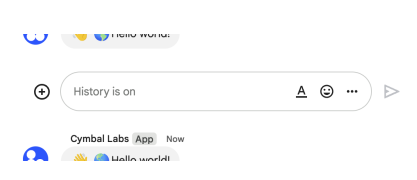
The following image shows how Chat attributes a message when you use app
authentication. Chat displays the Chat app as the message
sender. The content of the message can contain text (text), cards
(cardsV2), and accessory widgets (accessoryWidgets).
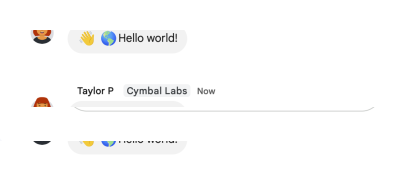
The following image shows how Chat attributes a message when you use user
authentication. Chat displays the user as the message sender and attributes
the Chat app to the message by displaying its name. The content of message
can only contain text (text).
The maximum message size, including the message contents, is 32,000 bytes.
For
webhook
requests, the response doesn't contain the full message. The response only
populates the name and thread.name fields in addition to the
information that was in the request.
The async variant is ChatServiceClient::createMessageAsync() .
| Parameters | |
|---|---|
| Name | Description |
request |
Google\Apps\Chat\V1\CreateMessageRequest
A request to house fields associated with the call. |
callOptions |
array
Optional. |
↳ retrySettings |
Google\ApiCore\RetrySettings|array
Retry settings to use for this call. Can be a Google\ApiCore\RetrySettings object, or an associative array of retry settings parameters. See the documentation on Google\ApiCore\RetrySettings for example usage. |
| Returns | |
|---|---|
| Type | Description |
Google\Apps\Chat\V1\Message |
|
use Google\ApiCore\ApiException;
use Google\Apps\Chat\V1\Client\ChatServiceClient;
use Google\Apps\Chat\V1\CreateMessageRequest;
use Google\Apps\Chat\V1\Message;

/**
 * @param string $formattedParent The resource name of the space in which to create a message.
 *
 *                                Format: `spaces/{space}`
 *                                Please see {@see ChatServiceClient::spaceName()} for help formatting this field.
 */
function create_message_sample(string $formattedParent): void
{
    // Create a client.
    $chatServiceClient = new ChatServiceClient();

    // Prepare the request message.
    $message = new Message();
    $request = (new CreateMessageRequest())
        ->setParent($formattedParent)
        ->setMessage($message);

    // Call the API and handle any network failures.
    try {
        /** @var Message $response */
        $response = $chatServiceClient->createMessage($request);
        printf('Response data: %s' . PHP_EOL, $response->serializeToJsonString());
    } catch (ApiException $ex) {
        printf('Call failed with message: %s' . PHP_EOL, $ex->getMessage());
    }
}

/**
 * Helper to execute the sample.
 *
 * This sample has been automatically generated and should be regarded as a code
 * template only. It will require modifications to work:
 *  - It may require correct/in-range values for request initialization.
 *  - It may require specifying regional endpoints when creating the service client,
 *    please see the apiEndpoint client configuration option for more details.
 */
function callSample(): void
{
    $formattedParent = ChatServiceClient::spaceName('[SPACE]');

    create_message_sample($formattedParent);
}
createMessagePin
Creates a message pin.
Requires user authentication with one of the following authorization scopes:
https://www.googleapis.com/auth/chat.spaces.pinshttps://www.googleapis.com/auth/chat.spaces
The async variant is ChatServiceClient::createMessagePinAsync() .
| Parameters | |
|---|---|
| Name | Description |
request |
Google\Apps\Chat\V1\CreateMessagePinRequest
A request to house fields associated with the call. |
callOptions |
array
Optional. |
↳ retrySettings |
Google\ApiCore\RetrySettings|array
Retry settings to use for this call. Can be a Google\ApiCore\RetrySettings object, or an associative array of retry settings parameters. See the documentation on Google\ApiCore\RetrySettings for example usage. |
| Returns | |
|---|---|
| Type | Description |
Google\Apps\Chat\V1\MessagePin |
|
use Google\ApiCore\ApiException;
use Google\Apps\Chat\V1\Client\ChatServiceClient;
use Google\Apps\Chat\V1\CreateMessagePinRequest;
use Google\Apps\Chat\V1\MessagePin;

/**
 * @param string $formattedParent            The parent space in which to create the message pin.
 *                                           Format: spaces/{space}
 *                                           Please see {@see ChatServiceClient::spaceName()} for help formatting this field.
 * @param string $formattedMessagePinMessage Immutable. The resource name of the message that is pinned.
 *                                           Format: `spaces/{space}/messages/{message}`
 *                                           Please see {@see ChatServiceClient::messageName()} for help formatting this field.
 */
function create_message_pin_sample(
    string $formattedParent,
    string $formattedMessagePinMessage
): void {
    // Create a client.
    $chatServiceClient = new ChatServiceClient();

    // Prepare the request message.
    $messagePin = (new MessagePin())
        ->setMessage($formattedMessagePinMessage);
    $request = (new CreateMessagePinRequest())
        ->setParent($formattedParent)
        ->setMessagePin($messagePin);

    // Call the API and handle any network failures.
    try {
        /** @var MessagePin $response */
        $response = $chatServiceClient->createMessagePin($request);
        printf('Response data: %s' . PHP_EOL, $response->serializeToJsonString());
    } catch (ApiException $ex) {
        printf('Call failed with message: %s' . PHP_EOL, $ex->getMessage());
    }
}

/**
 * Helper to execute the sample.
 *
 * This sample has been automatically generated and should be regarded as a code
 * template only. It will require modifications to work:
 *  - It may require correct/in-range values for request initialization.
 *  - It may require specifying regional endpoints when creating the service client,
 *    please see the apiEndpoint client configuration option for more details.
 */
function callSample(): void
{
    $formattedParent = ChatServiceClient::spaceName('[SPACE]');
    $formattedMessagePinMessage = ChatServiceClient::messageName('[SPACE]', '[MESSAGE]');

    create_message_pin_sample($formattedParent, $formattedMessagePinMessage);
}
createReaction
Creates a reaction and adds it to a message. For an example, see Add a reaction to a message.
Requires user authentication with one of the following authorization scopes:
https://www.googleapis.com/auth/chat.messages.reactions.createhttps://www.googleapis.com/auth/chat.messages.reactionshttps://www.googleapis.com/auth/chat.messageshttps://www.googleapis.com/auth/chat.import(import mode spaces only)
The async variant is ChatServiceClient::createReactionAsync() .
| Parameters | |
|---|---|
| Name | Description |
request |
Google\Apps\Chat\V1\CreateReactionRequest
A request to house fields associated with the call. |
callOptions |
array
Optional. |
↳ retrySettings |
Google\ApiCore\RetrySettings|array
Retry settings to use for this call. Can be a Google\ApiCore\RetrySettings object, or an associative array of retry settings parameters. See the documentation on Google\ApiCore\RetrySettings for example usage. |
| Returns | |
|---|---|
| Type | Description |
Google\Apps\Chat\V1\Reaction |
|
use Google\ApiCore\ApiException;
use Google\Apps\Chat\V1\Client\ChatServiceClient;
use Google\Apps\Chat\V1\CreateReactionRequest;
use Google\Apps\Chat\V1\Emoji;
use Google\Apps\Chat\V1\Reaction;

/**
 * @param string $formattedParent The message where the reaction is created.
 *
 *                                Format: `spaces/{space}/messages/{message}`
 *                                Please see {@see ChatServiceClient::messageName()} for help formatting this field.
 */
function create_reaction_sample(string $formattedParent): void
{
    // Create a client.
    $chatServiceClient = new ChatServiceClient();

    // Prepare the request message.
    $reactionEmoji = new Emoji();
    $reaction = (new Reaction())
        ->setEmoji($reactionEmoji);
    $request = (new CreateReactionRequest())
        ->setParent($formattedParent)
        ->setReaction($reaction);

    // Call the API and handle any network failures.
    try {
        /** @var Reaction $response */
        $response = $chatServiceClient->createReaction($request);
        printf('Response data: %s' . PHP_EOL, $response->serializeToJsonString());
    } catch (ApiException $ex) {
        printf('Call failed with message: %s' . PHP_EOL, $ex->getMessage());
    }
}

/**
 * Helper to execute the sample.
 *
 * This sample has been automatically generated and should be regarded as a code
 * template only. It will require modifications to work:
 *  - It may require correct/in-range values for request initialization.
 *  - It may require specifying regional endpoints when creating the service client,
 *    please see the apiEndpoint client configuration option for more details.
 */
function callSample(): void
{
    $formattedParent = ChatServiceClient::messageName('[SPACE]', '[MESSAGE]');

    create_reaction_sample($formattedParent);
}
createSection
Creates a section in Google Chat. Sections help users group conversations
and customize the list of spaces displayed in Chat navigation panel. Only
sections of type CUSTOM_SECTION can be created. For details, see Create
and organize sections in Google
Chat.
Requires user authentication with the authorization scope:
https://www.googleapis.com/auth/chat.users.sections
The async variant is ChatServiceClient::createSectionAsync() .
| Parameters | |
|---|---|
| Name | Description |
request |
Google\Apps\Chat\V1\CreateSectionRequest
A request to house fields associated with the call. |
callOptions |
array
Optional. |
↳ retrySettings |
Google\ApiCore\RetrySettings|array
Retry settings to use for this call. Can be a Google\ApiCore\RetrySettings object, or an associative array of retry settings parameters. See the documentation on Google\ApiCore\RetrySettings for example usage. |
| Returns | |
|---|---|
| Type | Description |
Google\Apps\Chat\V1\Section |
|
use Google\ApiCore\ApiException;
use Google\Apps\Chat\V1\Client\ChatServiceClient;
use Google\Apps\Chat\V1\CreateSectionRequest;
use Google\Apps\Chat\V1\Section;
use Google\Apps\Chat\V1\Section\SectionType;

/**
 * @param string $formattedParent The parent resource name where the section is created.
 *
 *                                Format: `users/{user}`
 *                                Please see {@see ChatServiceClient::userName()} for help formatting this field.
 * @param int    $sectionType     The type of the section.
 */
function create_section_sample(string $formattedParent, int $sectionType): void
{
    // Create a client.
    $chatServiceClient = new ChatServiceClient();

    // Prepare the request message.
    $section = (new Section())
        ->setType($sectionType);
    $request = (new CreateSectionRequest())
        ->setParent($formattedParent)
        ->setSection($section);

    // Call the API and handle any network failures.
    try {
        /** @var Section $response */
        $response = $chatServiceClient->createSection($request);
        printf('Response data: %s' . PHP_EOL, $response->serializeToJsonString());
    } catch (ApiException $ex) {
        printf('Call failed with message: %s' . PHP_EOL, $ex->getMessage());
    }
}

/**
 * Helper to execute the sample.
 *
 * This sample has been automatically generated and should be regarded as a code
 * template only. It will require modifications to work:
 *  - It may require correct/in-range values for request initialization.
 *  - It may require specifying regional endpoints when creating the service client,
 *    please see the apiEndpoint client configuration option for more details.
 */
function callSample(): void
{
    $formattedParent = ChatServiceClient::userName('[USER]');
    $sectionType = SectionType::SECTION_TYPE_UNSPECIFIED;

    create_section_sample($formattedParent, $sectionType);
}
createSpace
Creates a space. Can be used to create a named space, or a
group chat in Import mode. For an example, see Create a
space.
Supports the following types of authentication:
- App authentication with administrator approval and one of the following authorization scopes:
https://www.googleapis.com/auth/chat.app.spaces.createhttps://www.googleapis.com/auth/chat.app.spacesUser authentication with one of the following authorization scopes:
https://www.googleapis.com/auth/chat.spaces.createhttps://www.googleapis.com/auth/chat.spaceshttps://www.googleapis.com/auth/chat.import(import mode spaces only)
When authenticating as an app, the space.customer field must be set in
the request.
When authenticating as an app, the Chat app is added as a member of the
space. However, unlike human authentication, the Chat app is not added as a
space manager. By default, the Chat app can be removed from the space by
all space members. To allow only space managers to remove the app from a
space, set space.permission_settings.manage_apps to managers_allowed.
Space membership upon creation depends on whether the space is created in
Import mode:
- Import mode: No members are created.
- All other modes: The calling user is added as a member. This is:
- The app itself when using app authentication.
- The human user when using user authentication.
If you receive the error message ALREADY_EXISTS when creating
a space, try a different displayName. An existing space within
the Google Workspace organization might already use this display name.
The async variant is ChatServiceClient::createSpaceAsync() .
| Parameters | |
|---|---|
| Name | Description |
request |
Google\Apps\Chat\V1\CreateSpaceRequest
A request to house fields associated with the call. |
callOptions |
array
Optional. |
↳ retrySettings |
Google\ApiCore\RetrySettings|array
Retry settings to use for this call. Can be a Google\ApiCore\RetrySettings object, or an associative array of retry settings parameters. See the documentation on Google\ApiCore\RetrySettings for example usage. |
| Returns | |
|---|---|
| Type | Description |
Google\Apps\Chat\V1\Space |
|
use Google\ApiCore\ApiException;
use Google\Apps\Chat\V1\Client\ChatServiceClient;
use Google\Apps\Chat\V1\CreateSpaceRequest;
use Google\Apps\Chat\V1\Space;

/**
 * This sample has been automatically generated and should be regarded as a code
 * template only. It will require modifications to work:
 *  - It may require correct/in-range values for request initialization.
 *  - It may require specifying regional endpoints when creating the service client,
 *    please see the apiEndpoint client configuration option for more details.
 */
function create_space_sample(): void
{
    // Create a client.
    $chatServiceClient = new ChatServiceClient();

    // Prepare the request message.
    $space = new Space();
    $request = (new CreateSpaceRequest())
        ->setSpace($space);

    // Call the API and handle any network failures.
    try {
        /** @var Space $response */
        $response = $chatServiceClient->createSpace($request);
        printf('Response data: %s' . PHP_EOL, $response->serializeToJsonString());
    } catch (ApiException $ex) {
        printf('Call failed with message: %s' . PHP_EOL, $ex->getMessage());
    }
}
deleteCustomEmoji
Deletes a custom emoji. By default, users can only delete custom emoji they created. Emoji managers assigned by the administrator can delete any custom emoji in the organization. See Learn about custom emojis in Google Chat.
Custom emojis are only available for Google Workspace accounts, and the administrator must turn custom emojis on for the organization. For more information, see Learn about custom emojis in Google Chat and Manage custom emoji permissions.
Requires user authentication with the authorization scope:
https://www.googleapis.com/auth/chat.customemojis
The async variant is ChatServiceClient::deleteCustomEmojiAsync() .
| Parameters | |
|---|---|
| Name | Description |
request |
Google\Apps\Chat\V1\DeleteCustomEmojiRequest
A request to house fields associated with the call. |
callOptions |
array
Optional. |
↳ retrySettings |
Google\ApiCore\RetrySettings|array
Retry settings to use for this call. Can be a Google\ApiCore\RetrySettings object, or an associative array of retry settings parameters. See the documentation on Google\ApiCore\RetrySettings for example usage. |
use Google\ApiCore\ApiException;
use Google\Apps\Chat\V1\Client\ChatServiceClient;
use Google\Apps\Chat\V1\DeleteCustomEmojiRequest;

/**
 * @param string $formattedName Resource name of the custom emoji to delete.
 *
 *                              Format: `customEmojis/{customEmoji}`
 *
 *                              You can use the emoji name as an alias for `{customEmoji}`. For example,
 *                              `customEmojis/:example-emoji:` where `:example-emoji:` is the emoji name
 *                              for a custom emoji. Please see
 *                              {@see ChatServiceClient::customEmojiName()} for help formatting this field.
 */
function delete_custom_emoji_sample(string $formattedName): void
{
    // Create a client.
    $chatServiceClient = new ChatServiceClient();

    // Prepare the request message.
    $request = (new DeleteCustomEmojiRequest())
        ->setName($formattedName);

    // Call the API and handle any network failures.
    try {
        $chatServiceClient->deleteCustomEmoji($request);
        printf('Call completed successfully.' . PHP_EOL);
    } catch (ApiException $ex) {
        printf('Call failed with message: %s' . PHP_EOL, $ex->getMessage());
    }
}

/**
 * Helper to execute the sample.
 *
 * This sample has been automatically generated and should be regarded as a code
 * template only. It will require modifications to work:
 *  - It may require correct/in-range values for request initialization.
 *  - It may require specifying regional endpoints when creating the service client,
 *    please see the apiEndpoint client configuration option for more details.
 */
function callSample(): void
{
    $formattedName = ChatServiceClient::customEmojiName('[CUSTOM_EMOJI]');

    delete_custom_emoji_sample($formattedName);
}
deleteMembership
Deletes a membership. For an example, see Remove a user or a Google Chat app from a space.
Supports the following types of authentication:
- App authentication with administrator approval and the authorization scope:
https://www.googleapis.com/auth/chat.app.membershipsUser authentication with one of the following authorization scopes:
https://www.googleapis.com/auth/chat.membershipshttps://www.googleapis.com/auth/chat.memberships.app(to remove the calling app from the space)https://www.googleapis.com/auth/chat.import(import mode spaces only)- User authentication grants administrator privileges when an
administrator account authenticates,
use_admin_accessistrue, and the following authorization scope is used: https://www.googleapis.com/auth/chat.admin.memberships
App authentication is not supported for the following use cases:
- Removing a Google Group from a space.
- Removing a Chat app from a space.
To delete memberships for space managers, the requester must be a space manager. If you're using app authentication the Chat app must be the space creator.
The async variant is ChatServiceClient::deleteMembershipAsync() .
| Parameters | |
|---|---|
| Name | Description |
request |
Google\Apps\Chat\V1\DeleteMembershipRequest
A request to house fields associated with the call. |
callOptions |
array
Optional. |
↳ retrySettings |
Google\ApiCore\RetrySettings|array
Retry settings to use for this call. Can be a Google\ApiCore\RetrySettings object, or an associative array of retry settings parameters. See the documentation on Google\ApiCore\RetrySettings for example usage. |
| Returns | |
|---|---|
| Type | Description |
Google\Apps\Chat\V1\Membership |
|
use Google\ApiCore\ApiException;
use Google\Apps\Chat\V1\Client\ChatServiceClient;
use Google\Apps\Chat\V1\DeleteMembershipRequest;
use Google\Apps\Chat\V1\Membership;

/**
 * @param string $formattedName Resource name of the membership to delete. Chat apps can delete
 *                              human users' or their own memberships. Chat apps can't delete other apps'
 *                              memberships.
 *
 *                              When deleting a human membership, requires the `chat.memberships` scope
 *                              with [user
 *                              authentication](https://developers.google.com/workspace/chat/authenticate-authorize-chat-user)
 *                              or the `chat.memberships.app` scope with [app
 *                              authentication](https://developers.google.com/workspace/chat/authenticate-authorize-chat-app)
 *                              and the `spaces/{space}/members/{member}` format.
 *                              You can use the email as an alias for `{member}`. For example,
 *                              `spaces/{space}/members/example@gmail.com` where `example@gmail.com` is the
 *                              email of the Google Chat user.
 *
 *                              When deleting an app membership, requires the `chat.memberships.app` scope
 *                              and `spaces/{space}/members/app` format.
 *
 *                              Format: `spaces/{space}/members/{member}` or `spaces/{space}/members/app`. Please see
 *                              {@see ChatServiceClient::membershipName()} for help formatting this field.
 */
function delete_membership_sample(string $formattedName): void
{
    // Create a client.
    $chatServiceClient = new ChatServiceClient();

    // Prepare the request message.
    $request = (new DeleteMembershipRequest())
        ->setName($formattedName);

    // Call the API and handle any network failures.
    try {
        /** @var Membership $response */
        $response = $chatServiceClient->deleteMembership($request);
        printf('Response data: %s' . PHP_EOL, $response->serializeToJsonString());
    } catch (ApiException $ex) {
        printf('Call failed with message: %s' . PHP_EOL, $ex->getMessage());
    }
}

/**
 * Helper to execute the sample.
 *
 * This sample has been automatically generated and should be regarded as a code
 * template only. It will require modifications to work:
 *  - It may require correct/in-range values for request initialization.
 *  - It may require specifying regional endpoints when creating the service client,
 *    please see the apiEndpoint client configuration option for more details.
 */
function callSample(): void
{
    $formattedName = ChatServiceClient::membershipName('[SPACE]', '[MEMBER]');

    delete_membership_sample($formattedName);
}
deleteMessage
Deletes a message.
For an example, see Delete a message.
Supports the following types of authentication:
- App authentication with the authorization scope:
https://www.googleapis.com/auth/chat.botUser authentication with one of the following authorization scopes:
https://www.googleapis.com/auth/chat.messageshttps://www.googleapis.com/auth/chat.import(import mode spaces only)
When using app authentication, requests can only delete messages created by the calling Chat app.
The async variant is ChatServiceClient::deleteMessageAsync() .
| Parameters | |
|---|---|
| Name | Description |
request |
Google\Apps\Chat\V1\DeleteMessageRequest
A request to house fields associated with the call. |
callOptions |
array
Optional. |
↳ retrySettings |
Google\ApiCore\RetrySettings|array
Retry settings to use for this call. Can be a Google\ApiCore\RetrySettings object, or an associative array of retry settings parameters. See the documentation on Google\ApiCore\RetrySettings for example usage. |
use Google\ApiCore\ApiException;
use Google\Apps\Chat\V1\Client\ChatServiceClient;
use Google\Apps\Chat\V1\DeleteMessageRequest;

/**
 * @param string $formattedName Resource name of the message.
 *
 *                              Format: `spaces/{space}/messages/{message}`
 *
 *                              If you've set a custom ID for your message, you can use the value from the
 *                              `clientAssignedMessageId` field for `{message}`. For details, see [Name a
 *                              message]
 *                              (https://developers.google.com/workspace/chat/create-messages#name_a_created_message). Please see
 *                              {@see ChatServiceClient::messageName()} for help formatting this field.
 */
function delete_message_sample(string $formattedName): void
{
    // Create a client.
    $chatServiceClient = new ChatServiceClient();

    // Prepare the request message.
    $request = (new DeleteMessageRequest())
        ->setName($formattedName);

    // Call the API and handle any network failures.
    try {
        $chatServiceClient->deleteMessage($request);
        printf('Call completed successfully.' . PHP_EOL);
    } catch (ApiException $ex) {
        printf('Call failed with message: %s' . PHP_EOL, $ex->getMessage());
    }
}

/**
 * Helper to execute the sample.
 *
 * This sample has been automatically generated and should be regarded as a code
 * template only. It will require modifications to work:
 *  - It may require correct/in-range values for request initialization.
 *  - It may require specifying regional endpoints when creating the service client,
 *    please see the apiEndpoint client configuration option for more details.
 */
function callSample(): void
{
    $formattedName = ChatServiceClient::messageName('[SPACE]', '[MESSAGE]');

    delete_message_sample($formattedName);
}
deleteMessagePin
Deletes a message pin.
Requires user authentication with one of the following authorization scopes:
https://www.googleapis.com/auth/chat.spaces.pinshttps://www.googleapis.com/auth/chat.spaces
The async variant is ChatServiceClient::deleteMessagePinAsync() .
| Parameters | |
|---|---|
| Name | Description |
request |
Google\Apps\Chat\V1\DeleteMessagePinRequest
A request to house fields associated with the call. |
callOptions |
array
Optional. |
↳ retrySettings |
Google\ApiCore\RetrySettings|array
Retry settings to use for this call. Can be a Google\ApiCore\RetrySettings object, or an associative array of retry settings parameters. See the documentation on Google\ApiCore\RetrySettings for example usage. |
use Google\ApiCore\ApiException;
use Google\Apps\Chat\V1\Client\ChatServiceClient;
use Google\Apps\Chat\V1\DeleteMessagePinRequest;

/**
 * @param string $formattedName The resource name of the message pin to remove.
 *                              Format: spaces/{space}/messagePins/{message_pin}
 *                              Please see {@see ChatServiceClient::messagePinName()} for help formatting this field.
 */
function delete_message_pin_sample(string $formattedName): void
{
    // Create a client.
    $chatServiceClient = new ChatServiceClient();

    // Prepare the request message.
    $request = (new DeleteMessagePinRequest())
        ->setName($formattedName);

    // Call the API and handle any network failures.
    try {
        $chatServiceClient->deleteMessagePin($request);
        printf('Call completed successfully.' . PHP_EOL);
    } catch (ApiException $ex) {
        printf('Call failed with message: %s' . PHP_EOL, $ex->getMessage());
    }
}

/**
 * Helper to execute the sample.
 *
 * This sample has been automatically generated and should be regarded as a code
 * template only. It will require modifications to work:
 *  - It may require correct/in-range values for request initialization.
 *  - It may require specifying regional endpoints when creating the service client,
 *    please see the apiEndpoint client configuration option for more details.
 */
function callSample(): void
{
    $formattedName = ChatServiceClient::messagePinName('[SPACE]', '[MESSAGE_PIN]');

    delete_message_pin_sample($formattedName);
}
deleteReaction
Deletes a reaction to a message. For an example, see Delete a reaction.
Requires user authentication with one of the following authorization scopes:
https://www.googleapis.com/auth/chat.messages.reactionshttps://www.googleapis.com/auth/chat.messageshttps://www.googleapis.com/auth/chat.import(import mode spaces only)
The async variant is ChatServiceClient::deleteReactionAsync() .
| Parameters | |
|---|---|
| Name | Description |
request |
Google\Apps\Chat\V1\DeleteReactionRequest
A request to house fields associated with the call. |
callOptions |
array
Optional. |
↳ retrySettings |
Google\ApiCore\RetrySettings|array
Retry settings to use for this call. Can be a Google\ApiCore\RetrySettings object, or an associative array of retry settings parameters. See the documentation on Google\ApiCore\RetrySettings for example usage. |
use Google\ApiCore\ApiException;
use Google\Apps\Chat\V1\Client\ChatServiceClient;
use Google\Apps\Chat\V1\DeleteReactionRequest;

/**
 * @param string $formattedName Name of the reaction to delete.
 *
 *                              Format: `spaces/{space}/messages/{message}/reactions/{reaction}`
 *                              Please see {@see ChatServiceClient::reactionName()} for help formatting this field.
 */
function delete_reaction_sample(string $formattedName): void
{
    // Create a client.
    $chatServiceClient = new ChatServiceClient();

    // Prepare the request message.
    $request = (new DeleteReactionRequest())
        ->setName($formattedName);

    // Call the API and handle any network failures.
    try {
        $chatServiceClient->deleteReaction($request);
        printf('Call completed successfully.' . PHP_EOL);
    } catch (ApiException $ex) {
        printf('Call failed with message: %s' . PHP_EOL, $ex->getMessage());
    }
}

/**
 * Helper to execute the sample.
 *
 * This sample has been automatically generated and should be regarded as a code
 * template only. It will require modifications to work:
 *  - It may require correct/in-range values for request initialization.
 *  - It may require specifying regional endpoints when creating the service client,
 *    please see the apiEndpoint client configuration option for more details.
 */
function callSample(): void
{
    $formattedName = ChatServiceClient::reactionName('[SPACE]', '[MESSAGE]', '[REACTION]');

    delete_reaction_sample($formattedName);
}
deleteSection
Deletes a section of type CUSTOM_SECTION.
If the section contains items, such as spaces, the items are moved to Google Chat's default sections and are not deleted.
For details, see Create and organize sections in Google Chat.
Requires user authentication with the authorization scope:
https://www.googleapis.com/auth/chat.users.sections
The async variant is ChatServiceClient::deleteSectionAsync() .
| Parameters | |
|---|---|
| Name | Description |
request |
Google\Apps\Chat\V1\DeleteSectionRequest
A request to house fields associated with the call. |
callOptions |
array
Optional. |
↳ retrySettings |
Google\ApiCore\RetrySettings|array
Retry settings to use for this call. Can be a Google\ApiCore\RetrySettings object, or an associative array of retry settings parameters. See the documentation on Google\ApiCore\RetrySettings for example usage. |
use Google\ApiCore\ApiException;
use Google\Apps\Chat\V1\Client\ChatServiceClient;
use Google\Apps\Chat\V1\DeleteSectionRequest;

/**
 * @param string $formattedName The name of the section to delete.
 *
 *                              Format: `users/{user}/sections/{section}`
 *                              Please see {@see ChatServiceClient::sectionName()} for help formatting this field.
 */
function delete_section_sample(string $formattedName): void
{
    // Create a client.
    $chatServiceClient = new ChatServiceClient();

    // Prepare the request message.
    $request = (new DeleteSectionRequest())
        ->setName($formattedName);

    // Call the API and handle any network failures.
    try {
        $chatServiceClient->deleteSection($request);
        printf('Call completed successfully.' . PHP_EOL);
    } catch (ApiException $ex) {
        printf('Call failed with message: %s' . PHP_EOL, $ex->getMessage());
    }
}

/**
 * Helper to execute the sample.
 *
 * This sample has been automatically generated and should be regarded as a code
 * template only. It will require modifications to work:
 *  - It may require correct/in-range values for request initialization.
 *  - It may require specifying regional endpoints when creating the service client,
 *    please see the apiEndpoint client configuration option for more details.
 */
function callSample(): void
{
    $formattedName = ChatServiceClient::sectionName('[USER]', '[SECTION]');

    delete_section_sample($formattedName);
}
deleteSpace
Deletes a named space. Always performs a cascading delete, which means that the space's child resources—like messages posted in the space and memberships in the space—are also deleted. For an example, see Delete a space.
Supports the following types of authentication:
- App authentication with administrator approval and the authorization scope:
https://www.googleapis.com/auth/chat.app.delete(only in spaces the app created)User authentication with one of the following authorization scopes:
https://www.googleapis.com/auth/chat.deletehttps://www.googleapis.com/auth/chat.import(import mode spaces only)- User authentication grants administrator privileges when an
administrator account authenticates,
use_admin_accessistrue, and the following authorization scope is used: https://www.googleapis.com/auth/chat.admin.delete
The async variant is ChatServiceClient::deleteSpaceAsync() .
| Parameters | |
|---|---|
| Name | Description |
request |
Google\Apps\Chat\V1\DeleteSpaceRequest
A request to house fields associated with the call. |
callOptions |
array
Optional. |
↳ retrySettings |
Google\ApiCore\RetrySettings|array
Retry settings to use for this call. Can be a Google\ApiCore\RetrySettings object, or an associative array of retry settings parameters. See the documentation on Google\ApiCore\RetrySettings for example usage. |
use Google\ApiCore\ApiException;
use Google\Apps\Chat\V1\Client\ChatServiceClient;
use Google\Apps\Chat\V1\DeleteSpaceRequest;

/**
 * @param string $formattedName Resource name of the space to delete.
 *
 *                              Format: `spaces/{space}`
 *                              Please see {@see ChatServiceClient::spaceName()} for help formatting this field.
 */
function delete_space_sample(string $formattedName): void
{
    // Create a client.
    $chatServiceClient = new ChatServiceClient();

    // Prepare the request message.
    $request = (new DeleteSpaceRequest())
        ->setName($formattedName);

    // Call the API and handle any network failures.
    try {
        $chatServiceClient->deleteSpace($request);
        printf('Call completed successfully.' . PHP_EOL);
    } catch (ApiException $ex) {
        printf('Call failed with message: %s' . PHP_EOL, $ex->getMessage());
    }
}

/**
 * Helper to execute the sample.
 *
 * This sample has been automatically generated and should be regarded as a code
 * template only. It will require modifications to work:
 *  - It may require correct/in-range values for request initialization.
 *  - It may require specifying regional endpoints when creating the service client,
 *    please see the apiEndpoint client configuration option for more details.
 */
function callSample(): void
{
    $formattedName = ChatServiceClient::spaceName('[SPACE]');

    delete_space_sample($formattedName);
}
findDirectMessage
Returns the existing direct message with the specified user. If no direct
message space is found, returns a 404 NOT_FOUND error. For an example,
see
Find a direct message.
With app authentication, returns the direct message space between the specified user and the calling Chat app.
With user authentication, returns the direct message space between the specified user and the authenticated user.
Supports the following types of authentication:
- App authentication with the authorization scope:
https://www.googleapis.com/auth/chat.botUser authentication with one of the following authorization scopes:
https://www.googleapis.com/auth/chat.spaces.readonlyhttps://www.googleapis.com/auth/chat.spaces
The async variant is ChatServiceClient::findDirectMessageAsync() .
| Parameters | |
|---|---|
| Name | Description |
request |
Google\Apps\Chat\V1\FindDirectMessageRequest
A request to house fields associated with the call. |
callOptions |
array
Optional. |
↳ retrySettings |
Google\ApiCore\RetrySettings|array
Retry settings to use for this call. Can be a Google\ApiCore\RetrySettings object, or an associative array of retry settings parameters. See the documentation on Google\ApiCore\RetrySettings for example usage. |
| Returns | |
|---|---|
| Type | Description |
Google\Apps\Chat\V1\Space |
|
use Google\ApiCore\ApiException;
use Google\Apps\Chat\V1\Client\ChatServiceClient;
use Google\Apps\Chat\V1\FindDirectMessageRequest;
use Google\Apps\Chat\V1\Space;

/**
 * @param string $name Resource name of the user to find direct message with.
 *
 *                     Format: `users/{user}`, where `{user}` is either the `id` for the
 *                     [person](https://developers.google.com/people/api/rest/v1/people) from the
 *                     People API, or the `id` for the
 *                     [user](https://developers.google.com/admin-sdk/directory/reference/rest/v1/users)
 *                     in the Directory API. For example, if the People API profile ID is
 *                     `123456789`, you can find a direct message with that person by using
 *                     `users/123456789` as the `name`. When [authenticated as a
 *                     user](https://developers.google.com/workspace/chat/authenticate-authorize-chat-user),
 *                     you can use the email as an alias for `{user}`. For example,
 *                     `users/example@gmail.com` where `example@gmail.com` is the email of the
 *                     Google Chat user.
 */
function find_direct_message_sample(string $name): void
{
    // Create a client.
    $chatServiceClient = new ChatServiceClient();

    // Prepare the request message.
    $request = (new FindDirectMessageRequest())
        ->setName($name);

    // Call the API and handle any network failures.
    try {
        /** @var Space $response */
        $response = $chatServiceClient->findDirectMessage($request);
        printf('Response data: %s' . PHP_EOL, $response->serializeToJsonString());
    } catch (ApiException $ex) {
        printf('Call failed with message: %s' . PHP_EOL, $ex->getMessage());
    }
}

/**
 * Helper to execute the sample.
 *
 * This sample has been automatically generated and should be regarded as a code
 * template only. It will require modifications to work:
 *  - It may require correct/in-range values for request initialization.
 *  - It may require specifying regional endpoints when creating the service client,
 *    please see the apiEndpoint client configuration option for more details.
 */
function callSample(): void
{
    $name = '[NAME]';

    find_direct_message_sample($name);
}
findGroupChats
Returns all spaces with spaceType == GROUP_CHAT, whose
human memberships contain exactly the calling user, and the users specified
in FindGroupChatsRequest.users. Only members that have joined the
conversation are supported. For an example, see Find group
chats.
If the calling user blocks, or is blocked by, some users, and no spaces with the entire specified set of users are found, this method returns spaces that don't include the blocked or blocking users.
The specified set of users must contain only human (non-app) memberships. A request that contains non-human users doesn't return any spaces.
Requires user authentication with one of the following authorization scopes:
https://www.googleapis.com/auth/chat.memberships.readonlyhttps://www.googleapis.com/auth/chat.memberships
The async variant is ChatServiceClient::findGroupChatsAsync() .
| Parameters | |
|---|---|
| Name | Description |
request |
Google\Apps\Chat\V1\FindGroupChatsRequest
A request to house fields associated with the call. |
callOptions |
array
Optional. |
↳ retrySettings |
Google\ApiCore\RetrySettings|array
Retry settings to use for this call. Can be a Google\ApiCore\RetrySettings object, or an associative array of retry settings parameters. See the documentation on Google\ApiCore\RetrySettings for example usage. |
| Returns | |
|---|---|
| Type | Description |
Google\ApiCore\PagedListResponse |
|
use Google\ApiCore\ApiException;
use Google\ApiCore\PagedListResponse;
use Google\Apps\Chat\V1\Client\ChatServiceClient;
use Google\Apps\Chat\V1\FindGroupChatsRequest;
use Google\Apps\Chat\V1\Space;

/**
 * This sample has been automatically generated and should be regarded as a code
 * template only. It will require modifications to work:
 *  - It may require correct/in-range values for request initialization.
 *  - It may require specifying regional endpoints when creating the service client,
 *    please see the apiEndpoint client configuration option for more details.
 */
function find_group_chats_sample(): void
{
    // Create a client.
    $chatServiceClient = new ChatServiceClient();

    // Prepare the request message.
    $request = new FindGroupChatsRequest();

    // Call the API and handle any network failures.
    try {
        /** @var PagedListResponse $response */
        $response = $chatServiceClient->findGroupChats($request);

        /** @var Space $element */
        foreach ($response as $element) {
            printf('Element data: %s' . PHP_EOL, $element->serializeToJsonString());
        }
    } catch (ApiException $ex) {
        printf('Call failed with message: %s' . PHP_EOL, $ex->getMessage());
    }
}
getAttachment
Gets the metadata of a message attachment. The attachment data is fetched using the media API.
For an example, see Get metadata about a message attachment.
Requires app authentication with the authorization scope:
https://www.googleapis.com/auth/chat.bot
The async variant is ChatServiceClient::getAttachmentAsync() .
| Parameters | |
|---|---|
| Name | Description |
request |
Google\Apps\Chat\V1\GetAttachmentRequest
A request to house fields associated with the call. |
callOptions |
array
Optional. |
↳ retrySettings |
Google\ApiCore\RetrySettings|array
Retry settings to use for this call. Can be a Google\ApiCore\RetrySettings object, or an associative array of retry settings parameters. See the documentation on Google\ApiCore\RetrySettings for example usage. |
| Returns | |
|---|---|
| Type | Description |
Google\Apps\Chat\V1\Attachment |
|
use Google\ApiCore\ApiException;
use Google\Apps\Chat\V1\Attachment;
use Google\Apps\Chat\V1\Client\ChatServiceClient;
use Google\Apps\Chat\V1\GetAttachmentRequest;

/**
 * @param string $formattedName Resource name of the attachment, in the form
 *                              `spaces/{space}/messages/{message}/attachments/{attachment}`. Please see
 *                              {@see ChatServiceClient::attachmentName()} for help formatting this field.
 */
function get_attachment_sample(string $formattedName): void
{
    // Create a client.
    $chatServiceClient = new ChatServiceClient();

    // Prepare the request message.
    $request = (new GetAttachmentRequest())
        ->setName($formattedName);

    // Call the API and handle any network failures.
    try {
        /** @var Attachment $response */
        $response = $chatServiceClient->getAttachment($request);
        printf('Response data: %s' . PHP_EOL, $response->serializeToJsonString());
    } catch (ApiException $ex) {
        printf('Call failed with message: %s' . PHP_EOL, $ex->getMessage());
    }
}

/**
 * Helper to execute the sample.
 *
 * This sample has been automatically generated and should be regarded as a code
 * template only. It will require modifications to work:
 *  - It may require correct/in-range values for request initialization.
 *  - It may require specifying regional endpoints when creating the service client,
 *    please see the apiEndpoint client configuration option for more details.
 */
function callSample(): void
{
    $formattedName = ChatServiceClient::attachmentName('[SPACE]', '[MESSAGE]', '[ATTACHMENT]');

    get_attachment_sample($formattedName);
}
getAvailability
Returns availability information for a human user in Google Chat. For example, this can be used to check if a user is online or away, or to retrieve their custom status message.
This method only retrieves the authenticated user's availability.
Requires user authentication with one of the following authorization scopes:
https://www.googleapis.com/auth/chat.users.availability.readonlyhttps://www.googleapis.com/auth/chat.users.availability
The async variant is ChatServiceClient::getAvailabilityAsync() .
| Parameters | |
|---|---|
| Name | Description |
request |
Google\Apps\Chat\V1\GetAvailabilityRequest
A request to house fields associated with the call. |
callOptions |
array
Optional. |
↳ retrySettings |
Google\ApiCore\RetrySettings|array
Retry settings to use for this call. Can be a Google\ApiCore\RetrySettings object, or an associative array of retry settings parameters. See the documentation on Google\ApiCore\RetrySettings for example usage. |
| Returns | |
|---|---|
| Type | Description |
Google\Apps\Chat\V1\Availability |
|
use Google\ApiCore\ApiException;
use Google\Apps\Chat\V1\Availability;
use Google\Apps\Chat\V1\Client\ChatServiceClient;
use Google\Apps\Chat\V1\GetAvailabilityRequest;

/**
 * @param string $formattedName The resource name of the availability to retrieve.
 *
 *                              Format: users/{user}/availability
 *
 *                              `{user}` is the id for the Person in the People API or Admin SDK directory
 *                              API. For example, `users/123456789`.
 *
 *                              The user's email address or `me` can also be used as an alias to refer to
 *                              the caller.  For example, `users/user@example.com` or `users/me`. Please see
 *                              {@see ChatServiceClient::availabilityName()} for help formatting this field.
 */
function get_availability_sample(string $formattedName): void
{
    // Create a client.
    $chatServiceClient = new ChatServiceClient();

    // Prepare the request message.
    $request = (new GetAvailabilityRequest())
        ->setName($formattedName);

    // Call the API and handle any network failures.
    try {
        /** @var Availability $response */
        $response = $chatServiceClient->getAvailability($request);
        printf('Response data: %s' . PHP_EOL, $response->serializeToJsonString());
    } catch (ApiException $ex) {
        printf('Call failed with message: %s' . PHP_EOL, $ex->getMessage());
    }
}

/**
 * Helper to execute the sample.
 *
 * This sample has been automatically generated and should be regarded as a code
 * template only. It will require modifications to work:
 *  - It may require correct/in-range values for request initialization.
 *  - It may require specifying regional endpoints when creating the service client,
 *    please see the apiEndpoint client configuration option for more details.
 */
function callSample(): void
{
    $formattedName = ChatServiceClient::availabilityName('[USER]');

    get_availability_sample($formattedName);
}
getCustomEmoji
Returns details about a custom emoji.
Custom emojis are only available for Google Workspace accounts, and the administrator must turn custom emojis on for the organization. For more information, see Learn about custom emojis in Google Chat and Manage custom emoji permissions.
Requires user authentication with one of the following authorization scopes:
https://www.googleapis.com/auth/chat.customemojis.readonlyhttps://www.googleapis.com/auth/chat.customemojis
The async variant is ChatServiceClient::getCustomEmojiAsync() .
| Parameters | |
|---|---|
| Name | Description |
request |
Google\Apps\Chat\V1\GetCustomEmojiRequest
A request to house fields associated with the call. |
callOptions |
array
Optional. |
↳ retrySettings |
Google\ApiCore\RetrySettings|array
Retry settings to use for this call. Can be a Google\ApiCore\RetrySettings object, or an associative array of retry settings parameters. See the documentation on Google\ApiCore\RetrySettings for example usage. |
| Returns | |
|---|---|
| Type | Description |
Google\Apps\Chat\V1\CustomEmoji |
|
use Google\ApiCore\ApiException;
use Google\Apps\Chat\V1\Client\ChatServiceClient;
use Google\Apps\Chat\V1\CustomEmoji;
use Google\Apps\Chat\V1\GetCustomEmojiRequest;

/**
 * @param string $formattedName Resource name of the custom emoji.
 *
 *                              Format: `customEmojis/{customEmoji}`
 *
 *                              You can use the emoji name as an alias for `{customEmoji}`. For example,
 *                              `customEmojis/:example-emoji:` where `:example-emoji:` is the emoji name
 *                              for a custom emoji. Please see
 *                              {@see ChatServiceClient::customEmojiName()} for help formatting this field.
 */
function get_custom_emoji_sample(string $formattedName): void
{
    // Create a client.
    $chatServiceClient = new ChatServiceClient();

    // Prepare the request message.
    $request = (new GetCustomEmojiRequest())
        ->setName($formattedName);

    // Call the API and handle any network failures.
    try {
        /** @var CustomEmoji $response */
        $response = $chatServiceClient->getCustomEmoji($request);
        printf('Response data: %s' . PHP_EOL, $response->serializeToJsonString());
    } catch (ApiException $ex) {
        printf('Call failed with message: %s' . PHP_EOL, $ex->getMessage());
    }
}

/**
 * Helper to execute the sample.
 *
 * This sample has been automatically generated and should be regarded as a code
 * template only. It will require modifications to work:
 *  - It may require correct/in-range values for request initialization.
 *  - It may require specifying regional endpoints when creating the service client,
 *    please see the apiEndpoint client configuration option for more details.
 */
function callSample(): void
{
    $formattedName = ChatServiceClient::customEmojiName('[CUSTOM_EMOJI]');

    get_custom_emoji_sample($formattedName);
}
getMembership
Returns details about a membership. For an example, see Get details about a user's or Google Chat app's membership.
Supports the following types of authentication:
- App authentication with one of the following authorization scopes:
https://www.googleapis.com/auth/chat.bothttps://www.googleapis.com/auth/chat.app.memberships(requires administrator approval)User authentication with one of the following authorization scopes:
https://www.googleapis.com/auth/chat.memberships.readonlyhttps://www.googleapis.com/auth/chat.memberships- User authentication grants administrator privileges when an
administrator account authenticates,
use_admin_accessistrue, and one of the following authorization scopes is used: https://www.googleapis.com/auth/chat.admin.memberships.readonlyhttps://www.googleapis.com/auth/chat.admin.memberships
The async variant is ChatServiceClient::getMembershipAsync() .
| Parameters | |
|---|---|
| Name | Description |
request |
Google\Apps\Chat\V1\GetMembershipRequest
A request to house fields associated with the call. |
callOptions |
array
Optional. |
↳ retrySettings |
Google\ApiCore\RetrySettings|array
Retry settings to use for this call. Can be a Google\ApiCore\RetrySettings object, or an associative array of retry settings parameters. See the documentation on Google\ApiCore\RetrySettings for example usage. |
| Returns | |
|---|---|
| Type | Description |
Google\Apps\Chat\V1\Membership |
|
use Google\ApiCore\ApiException;
use Google\Apps\Chat\V1\Client\ChatServiceClient;
use Google\Apps\Chat\V1\GetMembershipRequest;
use Google\Apps\Chat\V1\Membership;

/**
 * @param string $formattedName Resource name of the membership to retrieve.
 *
 *                              To get the app's own membership [by using user
 *                              authentication](https://developers.google.com/workspace/chat/authenticate-authorize-chat-user),
 *                              you can optionally use `spaces/{space}/members/app`.
 *
 *                              Format: `spaces/{space}/members/{member}` or `spaces/{space}/members/app`
 *
 *                              You can use the user's email as an alias for `{member}`. For example,
 *                              `spaces/{space}/members/example@gmail.com` where `example@gmail.com` is the
 *                              email of the Google Chat user. Please see
 *                              {@see ChatServiceClient::membershipName()} for help formatting this field.
 */
function get_membership_sample(string $formattedName): void
{
    // Create a client.
    $chatServiceClient = new ChatServiceClient();

    // Prepare the request message.
    $request = (new GetMembershipRequest())
        ->setName($formattedName);

    // Call the API and handle any network failures.
    try {
        /** @var Membership $response */
        $response = $chatServiceClient->getMembership($request);
        printf('Response data: %s' . PHP_EOL, $response->serializeToJsonString());
    } catch (ApiException $ex) {
        printf('Call failed with message: %s' . PHP_EOL, $ex->getMessage());
    }
}

/**
 * Helper to execute the sample.
 *
 * This sample has been automatically generated and should be regarded as a code
 * template only. It will require modifications to work:
 *  - It may require correct/in-range values for request initialization.
 *  - It may require specifying regional endpoints when creating the service client,
 *    please see the apiEndpoint client configuration option for more details.
 */
function callSample(): void
{
    $formattedName = ChatServiceClient::membershipName('[SPACE]', '[MEMBER]');

    get_membership_sample($formattedName);
}
getMessage
Returns details about a message.
For an example, see Get details about a message.
Supports the following types of authentication:
- App authentication with one of the following authorization scopes:
https://www.googleapis.com/auth/chat.bot: When using this authorization scope, this method returns details about a message the Chat app has access to, like direct messages and slash commands that invoke the Chat app.https://www.googleapis.com/auth/chat.app.messages.readonlywith administrator approval. When using this authentication scope, this method returns details about a public message in a space.User authentication with one of the following authorization scopes:
https://www.googleapis.com/auth/chat.messages.readonlyhttps://www.googleapis.com/auth/chat.messages
Note: Might return a message from a blocked member or space.
The async variant is ChatServiceClient::getMessageAsync() .
| Parameters | |
|---|---|
| Name | Description |
request |
Google\Apps\Chat\V1\GetMessageRequest
A request to house fields associated with the call. |
callOptions |
array
Optional. |
↳ retrySettings |
Google\ApiCore\RetrySettings|array
Retry settings to use for this call. Can be a Google\ApiCore\RetrySettings object, or an associative array of retry settings parameters. See the documentation on Google\ApiCore\RetrySettings for example usage. |
| Returns | |
|---|---|
| Type | Description |
Google\Apps\Chat\V1\Message |
|
use Google\ApiCore\ApiException;
use Google\Apps\Chat\V1\Client\ChatServiceClient;
use Google\Apps\Chat\V1\GetMessageRequest;
use Google\Apps\Chat\V1\Message;

/**
 * @param string $formattedName Resource name of the message.
 *
 *                              Format: `spaces/{space}/messages/{message}`
 *
 *                              If you've set a custom ID for your message, you can use the value from the
 *                              `clientAssignedMessageId` field for `{message}`. For details, see [Name a
 *                              message]
 *                              (https://developers.google.com/workspace/chat/create-messages#name_a_created_message). Please see
 *                              {@see ChatServiceClient::messageName()} for help formatting this field.
 */
function get_message_sample(string $formattedName): void
{
    // Create a client.
    $chatServiceClient = new ChatServiceClient();

    // Prepare the request message.
    $request = (new GetMessageRequest())
        ->setName($formattedName);

    // Call the API and handle any network failures.
    try {
        /** @var Message $response */
        $response = $chatServiceClient->getMessage($request);
        printf('Response data: %s' . PHP_EOL, $response->serializeToJsonString());
    } catch (ApiException $ex) {
        printf('Call failed with message: %s' . PHP_EOL, $ex->getMessage());
    }
}

/**
 * Helper to execute the sample.
 *
 * This sample has been automatically generated and should be regarded as a code
 * template only. It will require modifications to work:
 *  - It may require correct/in-range values for request initialization.
 *  - It may require specifying regional endpoints when creating the service client,
 *    please see the apiEndpoint client configuration option for more details.
 */
function callSample(): void
{
    $formattedName = ChatServiceClient::messageName('[SPACE]', '[MESSAGE]');

    get_message_sample($formattedName);
}
getSpace
Returns details about a space. For an example, see Get details about a space.
Supports the following types of authentication:
- App authentication with one of the following authorization scopes:
https://www.googleapis.com/auth/chat.bothttps://www.googleapis.com/auth/chat.app.spaceswith administrator approvalUser authentication with one of the following authorization scopes:
https://www.googleapis.com/auth/chat.spaces.readonlyhttps://www.googleapis.com/auth/chat.spaces- User authentication grants administrator privileges when an
administrator account authenticates,
use_admin_accessistrue, and one of the following authorization scopes is used: https://www.googleapis.com/auth/chat.admin.spaces.readonlyhttps://www.googleapis.com/auth/chat.admin.spaces
App authentication has the following limitations:
space.access_settingsis only populated when using thechat.app.spacesscope.space.predefind_permission_settingsandspace.permission_settingsare only populated when using thechat.app.spacesscope, and only for spaces the app created.
The async variant is ChatServiceClient::getSpaceAsync() .
| Parameters | |
|---|---|
| Name | Description |
request |
Google\Apps\Chat\V1\GetSpaceRequest
A request to house fields associated with the call. |
callOptions |
array
Optional. |
↳ retrySettings |
Google\ApiCore\RetrySettings|array
Retry settings to use for this call. Can be a Google\ApiCore\RetrySettings object, or an associative array of retry settings parameters. See the documentation on Google\ApiCore\RetrySettings for example usage. |
| Returns | |
|---|---|
| Type | Description |
Google\Apps\Chat\V1\Space |
|
use Google\ApiCore\ApiException;
use Google\Apps\Chat\V1\Client\ChatServiceClient;
use Google\Apps\Chat\V1\GetSpaceRequest;
use Google\Apps\Chat\V1\Space;

/**
 * @param string $formattedName Resource name of the space, in the form `spaces/{space}`.
 *
 *                              Format: `spaces/{space}`
 *                              Please see {@see ChatServiceClient::spaceName()} for help formatting this field.
 */
function get_space_sample(string $formattedName): void
{
    // Create a client.
    $chatServiceClient = new ChatServiceClient();

    // Prepare the request message.
    $request = (new GetSpaceRequest())
        ->setName($formattedName);

    // Call the API and handle any network failures.
    try {
        /** @var Space $response */
        $response = $chatServiceClient->getSpace($request);
        printf('Response data: %s' . PHP_EOL, $response->serializeToJsonString());
    } catch (ApiException $ex) {
        printf('Call failed with message: %s' . PHP_EOL, $ex->getMessage());
    }
}

/**
 * Helper to execute the sample.
 *
 * This sample has been automatically generated and should be regarded as a code
 * template only. It will require modifications to work:
 *  - It may require correct/in-range values for request initialization.
 *  - It may require specifying regional endpoints when creating the service client,
 *    please see the apiEndpoint client configuration option for more details.
 */
function callSample(): void
{
    $formattedName = ChatServiceClient::spaceName('[SPACE]');

    get_space_sample($formattedName);
}
getSpaceEvent
Returns an event from a Google Chat space. The event
payload
contains the most recent version of the resource that changed. For example,
if you request an event about a new message but the message was later
updated, the server returns the updated Message resource in the event
payload.
Note: The permissionSettings field is not returned in the Space
object of the Space event data for this request.
Supports the following types of authentication with an authorization scope appropriate for reading the requested data:
- App authentication with administrator approval with one of the following authorization scopes:
https://www.googleapis.com/auth/chat.app.spaceshttps://www.googleapis.com/auth/chat.app.spaces.readonlyhttps://www.googleapis.com/auth/chat.app.messages.readonlyhttps://www.googleapis.com/auth/chat.app.membershipshttps://www.googleapis.com/auth/chat.app.memberships.readonlyUser authentication with one of the following authorization scopes:
https://www.googleapis.com/auth/chat.spaces.readonlyhttps://www.googleapis.com/auth/chat.spaceshttps://www.googleapis.com/auth/chat.messages.readonlyhttps://www.googleapis.com/auth/chat.messageshttps://www.googleapis.com/auth/chat.messages.reactions.readonlyhttps://www.googleapis.com/auth/chat.messages.reactionshttps://www.googleapis.com/auth/chat.memberships.readonlyhttps://www.googleapis.com/auth/chat.memberships
To get an event, the authenticated caller must be a member of the space.
For an example, see Get details about an event from a Google Chat space.
The async variant is ChatServiceClient::getSpaceEventAsync() .
| Parameters | |
|---|---|
| Name | Description |
request |
Google\Apps\Chat\V1\GetSpaceEventRequest
A request to house fields associated with the call. |
callOptions |
array
Optional. |
↳ retrySettings |
Google\ApiCore\RetrySettings|array
Retry settings to use for this call. Can be a Google\ApiCore\RetrySettings object, or an associative array of retry settings parameters. See the documentation on Google\ApiCore\RetrySettings for example usage. |
| Returns | |
|---|---|
| Type | Description |
Google\Apps\Chat\V1\SpaceEvent |
|
use Google\ApiCore\ApiException;
use Google\Apps\Chat\V1\Client\ChatServiceClient;
use Google\Apps\Chat\V1\GetSpaceEventRequest;
use Google\Apps\Chat\V1\SpaceEvent;

/**
 * @param string $formattedName The resource name of the space event.
 *
 *                              Format: `spaces/{space}/spaceEvents/{spaceEvent}`
 *                              Please see {@see ChatServiceClient::spaceEventName()} for help formatting this field.
 */
function get_space_event_sample(string $formattedName): void
{
    // Create a client.
    $chatServiceClient = new ChatServiceClient();

    // Prepare the request message.
    $request = (new GetSpaceEventRequest())
        ->setName($formattedName);

    // Call the API and handle any network failures.
    try {
        /** @var SpaceEvent $response */
        $response = $chatServiceClient->getSpaceEvent($request);
        printf('Response data: %s' . PHP_EOL, $response->serializeToJsonString());
    } catch (ApiException $ex) {
        printf('Call failed with message: %s' . PHP_EOL, $ex->getMessage());
    }
}

/**
 * Helper to execute the sample.
 *
 * This sample has been automatically generated and should be regarded as a code
 * template only. It will require modifications to work:
 *  - It may require correct/in-range values for request initialization.
 *  - It may require specifying regional endpoints when creating the service client,
 *    please see the apiEndpoint client configuration option for more details.
 */
function callSample(): void
{
    $formattedName = ChatServiceClient::spaceEventName('[SPACE]', '[SPACE_EVENT]');

    get_space_event_sample($formattedName);
}
getSpaceNotificationSetting
Gets the space notification setting. For an example, see Get the caller's space notification setting.
Requires user authentication with the authorization scope:
https://www.googleapis.com/auth/chat.users.spacesettings
The async variant is ChatServiceClient::getSpaceNotificationSettingAsync() .
| Parameters | |
|---|---|
| Name | Description |
request |
Google\Apps\Chat\V1\GetSpaceNotificationSettingRequest
A request to house fields associated with the call. |
callOptions |
array
Optional. |
↳ retrySettings |
Google\ApiCore\RetrySettings|array
Retry settings to use for this call. Can be a Google\ApiCore\RetrySettings object, or an associative array of retry settings parameters. See the documentation on Google\ApiCore\RetrySettings for example usage. |
| Returns | |
|---|---|
| Type | Description |
Google\Apps\Chat\V1\SpaceNotificationSetting |
|
use Google\ApiCore\ApiException;
use Google\Apps\Chat\V1\Client\ChatServiceClient;
use Google\Apps\Chat\V1\GetSpaceNotificationSettingRequest;
use Google\Apps\Chat\V1\SpaceNotificationSetting;

/**
 * @param string $formattedName Format: users/{user}/spaces/{space}/spaceNotificationSetting
 *
 *                              - `users/me/spaces/{space}/spaceNotificationSetting`, OR
 *                              - `users/user@example.com/spaces/{space}/spaceNotificationSetting`, OR
 *                              - `users/123456789/spaces/{space}/spaceNotificationSetting`.
 *                              Note: Only the caller's user id or email is allowed in the path. Please see
 *                              {@see ChatServiceClient::spaceNotificationSettingName()} for help formatting this field.
 */
function get_space_notification_setting_sample(string $formattedName): void
{
    // Create a client.
    $chatServiceClient = new ChatServiceClient();

    // Prepare the request message.
    $request = (new GetSpaceNotificationSettingRequest())
        ->setName($formattedName);

    // Call the API and handle any network failures.
    try {
        /** @var SpaceNotificationSetting $response */
        $response = $chatServiceClient->getSpaceNotificationSetting($request);
        printf('Response data: %s' . PHP_EOL, $response->serializeToJsonString());
    } catch (ApiException $ex) {
        printf('Call failed with message: %s' . PHP_EOL, $ex->getMessage());
    }
}

/**
 * Helper to execute the sample.
 *
 * This sample has been automatically generated and should be regarded as a code
 * template only. It will require modifications to work:
 *  - It may require correct/in-range values for request initialization.
 *  - It may require specifying regional endpoints when creating the service client,
 *    please see the apiEndpoint client configuration option for more details.
 */
function callSample(): void
{
    $formattedName = ChatServiceClient::spaceNotificationSettingName('[USER]', '[SPACE]');

    get_space_notification_setting_sample($formattedName);
}
getSpaceReadState
Returns details about a user's read state within a space, used to identify read and unread messages. For an example, see Get details about a user's space read state.
Requires user authentication with one of the following authorization scopes:
https://www.googleapis.com/auth/chat.users.readstate.readonlyhttps://www.googleapis.com/auth/chat.users.readstate
The async variant is ChatServiceClient::getSpaceReadStateAsync() .
| Parameters | |
|---|---|
| Name | Description |
request |
Google\Apps\Chat\V1\GetSpaceReadStateRequest
A request to house fields associated with the call. |
callOptions |
array
Optional. |
↳ retrySettings |
Google\ApiCore\RetrySettings|array
Retry settings to use for this call. Can be a Google\ApiCore\RetrySettings object, or an associative array of retry settings parameters. See the documentation on Google\ApiCore\RetrySettings for example usage. |
| Returns | |
|---|---|
| Type | Description |
Google\Apps\Chat\V1\SpaceReadState |
|
use Google\ApiCore\ApiException;
use Google\Apps\Chat\V1\Client\ChatServiceClient;
use Google\Apps\Chat\V1\GetSpaceReadStateRequest;
use Google\Apps\Chat\V1\SpaceReadState;

/**
 * @param string $formattedName Resource name of the space read state to retrieve.
 *
 *                              Only supports getting read state for the calling user.
 *
 *                              To refer to the calling user, set one of the following:
 *
 *                              - The `me` alias. For example, `users/me/spaces/{space}/spaceReadState`.
 *
 *                              - Their Workspace email address. For example,
 *                              `users/user@example.com/spaces/{space}/spaceReadState`.
 *
 *                              - Their user id. For example,
 *                              `users/123456789/spaces/{space}/spaceReadState`.
 *
 *                              Format: users/{user}/spaces/{space}/spaceReadState
 *                              Please see {@see ChatServiceClient::spaceReadStateName()} for help formatting this field.
 */
function get_space_read_state_sample(string $formattedName): void
{
    // Create a client.
    $chatServiceClient = new ChatServiceClient();

    // Prepare the request message.
    $request = (new GetSpaceReadStateRequest())
        ->setName($formattedName);

    // Call the API and handle any network failures.
    try {
        /** @var SpaceReadState $response */
        $response = $chatServiceClient->getSpaceReadState($request);
        printf('Response data: %s' . PHP_EOL, $response->serializeToJsonString());
    } catch (ApiException $ex) {
        printf('Call failed with message: %s' . PHP_EOL, $ex->getMessage());
    }
}

/**
 * Helper to execute the sample.
 *
 * This sample has been automatically generated and should be regarded as a code
 * template only. It will require modifications to work:
 *  - It may require correct/in-range values for request initialization.
 *  - It may require specifying regional endpoints when creating the service client,
 *    please see the apiEndpoint client configuration option for more details.
 */
function callSample(): void
{
    $formattedName = ChatServiceClient::spaceReadStateName('[USER]', '[SPACE]');

    get_space_read_state_sample($formattedName);
}
getThreadReadState
Returns details about a user's read state within a thread, used to identify read and unread messages. For an example, see Get details about a user's thread read state.
Requires user authentication with one of the following authorization scopes:
https://www.googleapis.com/auth/chat.users.readstate.readonlyhttps://www.googleapis.com/auth/chat.users.readstate
The async variant is ChatServiceClient::getThreadReadStateAsync() .
| Parameters | |
|---|---|
| Name | Description |
request |
Google\Apps\Chat\V1\GetThreadReadStateRequest
A request to house fields associated with the call. |
callOptions |
array
Optional. |
↳ retrySettings |
Google\ApiCore\RetrySettings|array
Retry settings to use for this call. Can be a Google\ApiCore\RetrySettings object, or an associative array of retry settings parameters. See the documentation on Google\ApiCore\RetrySettings for example usage. |
| Returns | |
|---|---|
| Type | Description |
Google\Apps\Chat\V1\ThreadReadState |
|
use Google\ApiCore\ApiException;
use Google\Apps\Chat\V1\Client\ChatServiceClient;
use Google\Apps\Chat\V1\GetThreadReadStateRequest;
use Google\Apps\Chat\V1\ThreadReadState;

/**
 * @param string $formattedName Resource name of the thread read state to retrieve.
 *
 *                              Only supports getting read state for the calling user.
 *
 *                              To refer to the calling user, set one of the following:
 *
 *                              - The `me` alias. For example,
 *                              `users/me/spaces/{space}/threads/{thread}/threadReadState`.
 *
 *                              - Their Workspace email address. For example,
 *                              `users/user@example.com/spaces/{space}/threads/{thread}/threadReadState`.
 *
 *                              - Their user id. For example,
 *                              `users/123456789/spaces/{space}/threads/{thread}/threadReadState`.
 *
 *                              Format: users/{user}/spaces/{space}/threads/{thread}/threadReadState
 *                              Please see {@see ChatServiceClient::threadReadStateName()} for help formatting this field.
 */
function get_thread_read_state_sample(string $formattedName): void
{
    // Create a client.
    $chatServiceClient = new ChatServiceClient();

    // Prepare the request message.
    $request = (new GetThreadReadStateRequest())
        ->setName($formattedName);

    // Call the API and handle any network failures.
    try {
        /** @var ThreadReadState $response */
        $response = $chatServiceClient->getThreadReadState($request);
        printf('Response data: %s' . PHP_EOL, $response->serializeToJsonString());
    } catch (ApiException $ex) {
        printf('Call failed with message: %s' . PHP_EOL, $ex->getMessage());
    }
}

/**
 * Helper to execute the sample.
 *
 * This sample has been automatically generated and should be regarded as a code
 * template only. It will require modifications to work:
 *  - It may require correct/in-range values for request initialization.
 *  - It may require specifying regional endpoints when creating the service client,
 *    please see the apiEndpoint client configuration option for more details.
 */
function callSample(): void
{
    $formattedName = ChatServiceClient::threadReadStateName('[USER]', '[SPACE]', '[THREAD]');

    get_thread_read_state_sample($formattedName);
}
listCustomEmojis
Lists custom emojis visible to the authenticated user.
Custom emojis are only available for Google Workspace accounts, and the administrator must turn custom emojis on for the organization. For more information, see Learn about custom emojis in Google Chat and Manage custom emoji permissions.
Requires user authentication with one of the following authorization scopes:
https://www.googleapis.com/auth/chat.customemojis.readonlyhttps://www.googleapis.com/auth/chat.customemojis
The async variant is ChatServiceClient::listCustomEmojisAsync() .
| Parameters | |
|---|---|
| Name | Description |
request |
Google\Apps\Chat\V1\ListCustomEmojisRequest
A request to house fields associated with the call. |
callOptions |
array
Optional. |
↳ retrySettings |
Google\ApiCore\RetrySettings|array
Retry settings to use for this call. Can be a Google\ApiCore\RetrySettings object, or an associative array of retry settings parameters. See the documentation on Google\ApiCore\RetrySettings for example usage. |
| Returns | |
|---|---|
| Type | Description |
Google\ApiCore\PagedListResponse |
|
use Google\ApiCore\ApiException;
use Google\ApiCore\PagedListResponse;
use Google\Apps\Chat\V1\Client\ChatServiceClient;
use Google\Apps\Chat\V1\CustomEmoji;
use Google\Apps\Chat\V1\ListCustomEmojisRequest;

/**
 * This sample has been automatically generated and should be regarded as a code
 * template only. It will require modifications to work:
 *  - It may require correct/in-range values for request initialization.
 *  - It may require specifying regional endpoints when creating the service client,
 *    please see the apiEndpoint client configuration option for more details.
 */
function list_custom_emojis_sample(): void
{
    // Create a client.
    $chatServiceClient = new ChatServiceClient();

    // Prepare the request message.
    $request = new ListCustomEmojisRequest();

    // Call the API and handle any network failures.
    try {
        /** @var PagedListResponse $response */
        $response = $chatServiceClient->listCustomEmojis($request);

        /** @var CustomEmoji $element */
        foreach ($response as $element) {
            printf('Element data: %s' . PHP_EOL, $element->serializeToJsonString());
        }
    } catch (ApiException $ex) {
        printf('Call failed with message: %s' . PHP_EOL, $ex->getMessage());
    }
}
listMemberships
Lists memberships in a space. For an example, see List users and Google Chat apps in a space. Listing memberships with app authentication lists memberships in spaces that the Chat app has access to, but excludes Chat app memberships, including its own. Listing memberships with User authentication lists memberships in spaces that the authenticated user has access to.
Supports the following types of authentication:
- App authentication with one of the following authorization scopes:
https://www.googleapis.com/auth/chat.bothttps://www.googleapis.com/auth/chat.app.memberships(requires administrator approval)User authentication with one of the following authorization scopes:
https://www.googleapis.com/auth/chat.memberships.readonlyhttps://www.googleapis.com/auth/chat.membershipshttps://www.googleapis.com/auth/chat.import(import mode spaces only)- User authentication grants administrator privileges when an
administrator account authenticates,
use_admin_accessistrue, and one of the following authorization scopes is used: https://www.googleapis.com/auth/chat.admin.memberships.readonlyhttps://www.googleapis.com/auth/chat.admin.memberships
The async variant is ChatServiceClient::listMembershipsAsync() .
| Parameters | |
|---|---|
| Name | Description |
request |
Google\Apps\Chat\V1\ListMembershipsRequest
A request to house fields associated with the call. |
callOptions |
array
Optional. |
↳ retrySettings |
Google\ApiCore\RetrySettings|array
Retry settings to use for this call. Can be a Google\ApiCore\RetrySettings object, or an associative array of retry settings parameters. See the documentation on Google\ApiCore\RetrySettings for example usage. |
| Returns | |
|---|---|
| Type | Description |
Google\ApiCore\PagedListResponse |
|
use Google\ApiCore\ApiException;
use Google\ApiCore\PagedListResponse;
use Google\Apps\Chat\V1\Client\ChatServiceClient;
use Google\Apps\Chat\V1\ListMembershipsRequest;
use Google\Apps\Chat\V1\Membership;

/**
 * @param string $formattedParent The resource name of the space for which to fetch a membership
 *                                list.
 *
 *                                Format: spaces/{space}
 *                                Please see {@see ChatServiceClient::spaceName()} for help formatting this field.
 */
function list_memberships_sample(string $formattedParent): void
{
    // Create a client.
    $chatServiceClient = new ChatServiceClient();

    // Prepare the request message.
    $request = (new ListMembershipsRequest())
        ->setParent($formattedParent);

    // Call the API and handle any network failures.
    try {
        /** @var PagedListResponse $response */
        $response = $chatServiceClient->listMemberships($request);

        /** @var Membership $element */
        foreach ($response as $element) {
            printf('Element data: %s' . PHP_EOL, $element->serializeToJsonString());
        }
    } catch (ApiException $ex) {
        printf('Call failed with message: %s' . PHP_EOL, $ex->getMessage());
    }
}

/**
 * Helper to execute the sample.
 *
 * This sample has been automatically generated and should be regarded as a code
 * template only. It will require modifications to work:
 *  - It may require correct/in-range values for request initialization.
 *  - It may require specifying regional endpoints when creating the service client,
 *    please see the apiEndpoint client configuration option for more details.
 */
function callSample(): void
{
    $formattedParent = ChatServiceClient::spaceName('[SPACE]');

    list_memberships_sample($formattedParent);
}
listMessagePins
Lists message pins in a space. Users can pin important messages in spaces for easy access. For more information, see Pin or unpin a conversation in Google Chat.
Requires user authentication with one of the following authorization scopes:
https://www.googleapis.com/auth/chat.spaces.pins.readonlyhttps://www.googleapis.com/auth/chat.spaces.pinshttps://www.googleapis.com/auth/chat.spaces.readonlyhttps://www.googleapis.com/auth/chat.spaces
The async variant is ChatServiceClient::listMessagePinsAsync() .
| Parameters | |
|---|---|
| Name | Description |
request |
Google\Apps\Chat\V1\ListMessagePinsRequest
A request to house fields associated with the call. |
callOptions |
array
Optional. |
↳ retrySettings |
Google\ApiCore\RetrySettings|array
Retry settings to use for this call. Can be a Google\ApiCore\RetrySettings object, or an associative array of retry settings parameters. See the documentation on Google\ApiCore\RetrySettings for example usage. |
| Returns | |
|---|---|
| Type | Description |
Google\ApiCore\PagedListResponse |
|
use Google\ApiCore\ApiException;
use Google\ApiCore\PagedListResponse;
use Google\Apps\Chat\V1\Client\ChatServiceClient;
use Google\Apps\Chat\V1\ListMessagePinsRequest;
use Google\Apps\Chat\V1\MessagePin;

/**
 * @param string $formattedParent The parent space which owns the collection of pinned items
 *                                Format: `spaces/{space}`
 *                                Please see {@see ChatServiceClient::spaceName()} for help formatting this field.
 */
function list_message_pins_sample(string $formattedParent): void
{
    // Create a client.
    $chatServiceClient = new ChatServiceClient();

    // Prepare the request message.
    $request = (new ListMessagePinsRequest())
        ->setParent($formattedParent);

    // Call the API and handle any network failures.
    try {
        /** @var PagedListResponse $response */
        $response = $chatServiceClient->listMessagePins($request);

        /** @var MessagePin $element */
        foreach ($response as $element) {
            printf('Element data: %s' . PHP_EOL, $element->serializeToJsonString());
        }
    } catch (ApiException $ex) {
        printf('Call failed with message: %s' . PHP_EOL, $ex->getMessage());
    }
}

/**
 * Helper to execute the sample.
 *
 * This sample has been automatically generated and should be regarded as a code
 * template only. It will require modifications to work:
 *  - It may require correct/in-range values for request initialization.
 *  - It may require specifying regional endpoints when creating the service client,
 *    please see the apiEndpoint client configuration option for more details.
 */
function callSample(): void
{
    $formattedParent = ChatServiceClient::spaceName('[SPACE]');

    list_message_pins_sample($formattedParent);
}
listMessages
Lists messages in a space that the caller is a member of, including
messages from blocked members and spaces. System messages, like those
announcing new space members, aren't included. If you list messages from a
space with no messages, the response is an empty object. When using a
REST/HTTP interface, the response contains an empty JSON object, {}.
For an example, see List messages.
Supports the following types of authentication:
- App authentication with administrator approval with the authorization scope:
https://www.googleapis.com/auth/chat.app.messages.readonly. When using this authentication scope, this method only returns public messages in a space. It doesn't include private messages.User authentication with one of the following authorization scopes:
https://www.googleapis.com/auth/chat.messages.readonlyhttps://www.googleapis.com/auth/chat.messageshttps://www.googleapis.com/auth/chat.import(import mode spaces only)
The async variant is ChatServiceClient::listMessagesAsync() .
| Parameters | |
|---|---|
| Name | Description |
request |
Google\Apps\Chat\V1\ListMessagesRequest
A request to house fields associated with the call. |
callOptions |
array
Optional. |
↳ retrySettings |
Google\ApiCore\RetrySettings|array
Retry settings to use for this call. Can be a Google\ApiCore\RetrySettings object, or an associative array of retry settings parameters. See the documentation on Google\ApiCore\RetrySettings for example usage. |
| Returns | |
|---|---|
| Type | Description |
Google\ApiCore\PagedListResponse |
|
use Google\ApiCore\ApiException;
use Google\ApiCore\PagedListResponse;
use Google\Apps\Chat\V1\Client\ChatServiceClient;
use Google\Apps\Chat\V1\ListMessagesRequest;
use Google\Apps\Chat\V1\Message;

/**
 * @param string $formattedParent The resource name of the space to list messages from.
 *
 *                                Format: `spaces/{space}`
 *                                Please see {@see ChatServiceClient::spaceName()} for help formatting this field.
 */
function list_messages_sample(string $formattedParent): void
{
    // Create a client.
    $chatServiceClient = new ChatServiceClient();

    // Prepare the request message.
    $request = (new ListMessagesRequest())
        ->setParent($formattedParent);

    // Call the API and handle any network failures.
    try {
        /** @var PagedListResponse $response */
        $response = $chatServiceClient->listMessages($request);

        /** @var Message $element */
        foreach ($response as $element) {
            printf('Element data: %s' . PHP_EOL, $element->serializeToJsonString());
        }
    } catch (ApiException $ex) {
        printf('Call failed with message: %s' . PHP_EOL, $ex->getMessage());
    }
}

/**
 * Helper to execute the sample.
 *
 * This sample has been automatically generated and should be regarded as a code
 * template only. It will require modifications to work:
 *  - It may require correct/in-range values for request initialization.
 *  - It may require specifying regional endpoints when creating the service client,
 *    please see the apiEndpoint client configuration option for more details.
 */
function callSample(): void
{
    $formattedParent = ChatServiceClient::spaceName('[SPACE]');

    list_messages_sample($formattedParent);
}
listReactions
Lists reactions to a message. For an example, see List reactions for a message.
Requires user authentication with one of the following authorization scopes:
https://www.googleapis.com/auth/chat.messages.reactions.readonlyhttps://www.googleapis.com/auth/chat.messages.reactionshttps://www.googleapis.com/auth/chat.messages.readonlyhttps://www.googleapis.com/auth/chat.messages
The async variant is ChatServiceClient::listReactionsAsync() .
| Parameters | |
|---|---|
| Name | Description |
request |
Google\Apps\Chat\V1\ListReactionsRequest
A request to house fields associated with the call. |
callOptions |
array
Optional. |
↳ retrySettings |
Google\ApiCore\RetrySettings|array
Retry settings to use for this call. Can be a Google\ApiCore\RetrySettings object, or an associative array of retry settings parameters. See the documentation on Google\ApiCore\RetrySettings for example usage. |
| Returns | |
|---|---|
| Type | Description |
Google\ApiCore\PagedListResponse |
|
use Google\ApiCore\ApiException;
use Google\ApiCore\PagedListResponse;
use Google\Apps\Chat\V1\Client\ChatServiceClient;
use Google\Apps\Chat\V1\ListReactionsRequest;
use Google\Apps\Chat\V1\Reaction;

/**
 * @param string $formattedParent The message users reacted to.
 *
 *                                Format: `spaces/{space}/messages/{message}`
 *                                Please see {@see ChatServiceClient::messageName()} for help formatting this field.
 */
function list_reactions_sample(string $formattedParent): void
{
    // Create a client.
    $chatServiceClient = new ChatServiceClient();

    // Prepare the request message.
    $request = (new ListReactionsRequest())
        ->setParent($formattedParent);

    // Call the API and handle any network failures.
    try {
        /** @var PagedListResponse $response */
        $response = $chatServiceClient->listReactions($request);

        /** @var Reaction $element */
        foreach ($response as $element) {
            printf('Element data: %s' . PHP_EOL, $element->serializeToJsonString());
        }
    } catch (ApiException $ex) {
        printf('Call failed with message: %s' . PHP_EOL, $ex->getMessage());
    }
}

/**
 * Helper to execute the sample.
 *
 * This sample has been automatically generated and should be regarded as a code
 * template only. It will require modifications to work:
 *  - It may require correct/in-range values for request initialization.
 *  - It may require specifying regional endpoints when creating the service client,
 *    please see the apiEndpoint client configuration option for more details.
 */
function callSample(): void
{
    $formattedParent = ChatServiceClient::messageName('[SPACE]', '[MESSAGE]');

    list_reactions_sample($formattedParent);
}
listSectionItems
Lists items in a section.
Only spaces can be section items. For details, see Create and organize sections in Google Chat.
Requires user authentication with the authorization scope:
https://www.googleapis.com/auth/chat.users.sectionshttps://www.googleapis.com/auth/chat.users.sections.readonly
The async variant is ChatServiceClient::listSectionItemsAsync() .
| Parameters | |
|---|---|
| Name | Description |
request |
Google\Apps\Chat\V1\ListSectionItemsRequest
A request to house fields associated with the call. |
callOptions |
array
Optional. |
↳ retrySettings |
Google\ApiCore\RetrySettings|array
Retry settings to use for this call. Can be a Google\ApiCore\RetrySettings object, or an associative array of retry settings parameters. See the documentation on Google\ApiCore\RetrySettings for example usage. |
| Returns | |
|---|---|
| Type | Description |
Google\ApiCore\PagedListResponse |
|
use Google\ApiCore\ApiException;
use Google\ApiCore\PagedListResponse;
use Google\Apps\Chat\V1\Client\ChatServiceClient;
use Google\Apps\Chat\V1\ListSectionItemsRequest;
use Google\Apps\Chat\V1\SectionItem;

/**
 * @param string $formattedParent The parent, which is the section resource name that owns this
 *                                collection of section items. Only supports listing section items for the
 *                                calling user.
 *
 *                                When you're filtering by space, use the wildcard `-` to search across all
 *                                sections. For example, `users/{user}/sections/-`.
 *
 *                                Format: `users/{user}/sections/{section}`
 *                                Please see {@see ChatServiceClient::sectionName()} for help formatting this field.
 */
function list_section_items_sample(string $formattedParent): void
{
    // Create a client.
    $chatServiceClient = new ChatServiceClient();

    // Prepare the request message.
    $request = (new ListSectionItemsRequest())
        ->setParent($formattedParent);

    // Call the API and handle any network failures.
    try {
        /** @var PagedListResponse $response */
        $response = $chatServiceClient->listSectionItems($request);

        /** @var SectionItem $element */
        foreach ($response as $element) {
            printf('Element data: %s' . PHP_EOL, $element->serializeToJsonString());
        }
    } catch (ApiException $ex) {
        printf('Call failed with message: %s' . PHP_EOL, $ex->getMessage());
    }
}

/**
 * Helper to execute the sample.
 *
 * This sample has been automatically generated and should be regarded as a code
 * template only. It will require modifications to work:
 *  - It may require correct/in-range values for request initialization.
 *  - It may require specifying regional endpoints when creating the service client,
 *    please see the apiEndpoint client configuration option for more details.
 */
function callSample(): void
{
    $formattedParent = ChatServiceClient::sectionName('[USER]', '[SECTION]');

    list_section_items_sample($formattedParent);
}
listSections
Lists sections available to the Chat user. Sections help users group their conversations and customize the list of spaces displayed in Chat navigation panel. For details, see Create and organize sections in Google Chat.
Requires user authentication with the authorization scope:
https://www.googleapis.com/auth/chat.users.sectionshttps://www.googleapis.com/auth/chat.users.sections.readonly
The async variant is ChatServiceClient::listSectionsAsync() .
| Parameters | |
|---|---|
| Name | Description |
request |
Google\Apps\Chat\V1\ListSectionsRequest
A request to house fields associated with the call. |
callOptions |
array
Optional. |
↳ retrySettings |
Google\ApiCore\RetrySettings|array
Retry settings to use for this call. Can be a Google\ApiCore\RetrySettings object, or an associative array of retry settings parameters. See the documentation on Google\ApiCore\RetrySettings for example usage. |
| Returns | |
|---|---|
| Type | Description |
Google\ApiCore\PagedListResponse |
|
use Google\ApiCore\ApiException;
use Google\ApiCore\PagedListResponse;
use Google\Apps\Chat\V1\Client\ChatServiceClient;
use Google\Apps\Chat\V1\ListSectionsRequest;
use Google\Apps\Chat\V1\Section;

/**
 * @param string $formattedParent The parent, which is the user resource name that owns this
 *                                collection of sections. Only supports listing sections for the calling
 *                                user. To refer to the calling user, set one of the following:
 *
 *                                - The `me` alias. For example, `users/me`.
 *
 *                                - Their Workspace email address. For example, `users/user@example.com`.
 *
 *                                - Their user id. For example, `users/123456789`.
 *
 *                                Format: `users/{user}`
 *                                Please see {@see ChatServiceClient::userName()} for help formatting this field.
 */
function list_sections_sample(string $formattedParent): void
{
    // Create a client.
    $chatServiceClient = new ChatServiceClient();

    // Prepare the request message.
    $request = (new ListSectionsRequest())
        ->setParent($formattedParent);

    // Call the API and handle any network failures.
    try {
        /** @var PagedListResponse $response */
        $response = $chatServiceClient->listSections($request);

        /** @var Section $element */
        foreach ($response as $element) {
            printf('Element data: %s' . PHP_EOL, $element->serializeToJsonString());
        }
    } catch (ApiException $ex) {
        printf('Call failed with message: %s' . PHP_EOL, $ex->getMessage());
    }
}

/**
 * Helper to execute the sample.
 *
 * This sample has been automatically generated and should be regarded as a code
 * template only. It will require modifications to work:
 *  - It may require correct/in-range values for request initialization.
 *  - It may require specifying regional endpoints when creating the service client,
 *    please see the apiEndpoint client configuration option for more details.
 */
function callSample(): void
{
    $formattedParent = ChatServiceClient::userName('[USER]');

    list_sections_sample($formattedParent);
}
listSpaceEvents
Lists events from a Google Chat space. For each event, the
payload
contains the most recent version of the Chat resource. For example, if you
list events about new space members, the server returns Membership
resources that contain the latest membership details. If new members were
removed during the requested period, the event payload contains an empty
Membership resource.
Supports the following types of authentication with an authorization scope appropriate for reading the requested data:
- App authentication with administrator approval with one of the following authorization scopes:
https://www.googleapis.com/auth/chat.app.spaceshttps://www.googleapis.com/auth/chat.app.spaces.readonlyhttps://www.googleapis.com/auth/chat.app.messages.readonlyhttps://www.googleapis.com/auth/chat.app.membershipshttps://www.googleapis.com/auth/chat.app.memberships.readonlyUser authentication with one of the following authorization scopes:
https://www.googleapis.com/auth/chat.spaces.readonlyhttps://www.googleapis.com/auth/chat.spaceshttps://www.googleapis.com/auth/chat.messages.readonlyhttps://www.googleapis.com/auth/chat.messageshttps://www.googleapis.com/auth/chat.messages.reactions.readonlyhttps://www.googleapis.com/auth/chat.messages.reactionshttps://www.googleapis.com/auth/chat.memberships.readonlyhttps://www.googleapis.com/auth/chat.memberships
To list events, the authenticated caller must be a member of the space.
For an example, see List events from a Google Chat space.
The async variant is ChatServiceClient::listSpaceEventsAsync() .
| Parameters | |
|---|---|
| Name | Description |
request |
Google\Apps\Chat\V1\ListSpaceEventsRequest
A request to house fields associated with the call. |
callOptions |
array
Optional. |
↳ retrySettings |
Google\ApiCore\RetrySettings|array
Retry settings to use for this call. Can be a Google\ApiCore\RetrySettings object, or an associative array of retry settings parameters. See the documentation on Google\ApiCore\RetrySettings for example usage. |
| Returns | |
|---|---|
| Type | Description |
Google\ApiCore\PagedListResponse |
|
use Google\ApiCore\ApiException;
use Google\ApiCore\PagedListResponse;
use Google\Apps\Chat\V1\Client\ChatServiceClient;
use Google\Apps\Chat\V1\ListSpaceEventsRequest;
use Google\Apps\Chat\V1\SpaceEvent;

/**
 * @param string $formattedParent Resource name of the [Google Chat
 *                                space](https://developers.google.com/workspace/chat/api/reference/rest/v1/spaces)
 *                                where the events occurred.
 *
 *                                Format: `spaces/{space}`. Please see
 *                                {@see ChatServiceClient::spaceName()} for help formatting this field.
 * @param string $filter          A query filter.
 *
 *                                You must specify at least one event type (`event_type`)
 *                                using the has `:` operator. To filter by multiple event types, use the `OR`
 *                                operator. Omit batch event types in your filter. The request automatically
 *                                returns any related batch events. For example, if you filter by new
 *                                reactions
 *                                (`google.workspace.chat.reaction.v1.created`), the server also returns
 *                                batch new reactions events
 *                                (`google.workspace.chat.reaction.v1.batchCreated`). For a list of supported
 *                                event types, see the [`SpaceEvents` reference
 *                                documentation](https://developers.google.com/workspace/chat/api/reference/rest/v1/spaces.spaceEvents#SpaceEvent.FIELDS.event_type).
 *
 *                                Optionally, you can also filter by start time (`start_time`) and
 *                                end time (`end_time`):
 *
 *                                * `start_time`: Exclusive timestamp from which to start listing space
 *                                events.
 *                                You can list events that occurred up to 28 days ago. If unspecified, lists
 *                                space events from the past 28 days.
 *                                * `end_time`: Inclusive timestamp until which space events are listed.
 *                                If unspecified, lists events up to the time of the request.
 *
 *                                To specify a start or end time, use the equals `=` operator and format in
 *                                [RFC-3339](https://www.rfc-editor.org/rfc/rfc3339). To filter by both
 *                                `start_time` and `end_time`, use the `AND` operator.
 *
 *                                For example, the following queries are valid:
 *
 *                                ```
 *                                start_time="2023-08-23T19:20:33+00:00" AND
 *                                end_time="2023-08-23T19:21:54+00:00"
 *                                ```
 *                                ```
 *                                start_time="2023-08-23T19:20:33+00:00" AND
 *                                (event_types:"google.workspace.chat.space.v1.updated" OR
 *                                event_types:"google.workspace.chat.message.v1.created")
 *                                ```
 *
 *                                The following queries are invalid:
 *
 *                                ```
 *                                start_time="2023-08-23T19:20:33+00:00" OR
 *                                end_time="2023-08-23T19:21:54+00:00"
 *                                ```
 *                                ```
 *                                event_types:"google.workspace.chat.space.v1.updated" AND
 *                                event_types:"google.workspace.chat.message.v1.created"
 *                                ```
 *
 *                                Invalid queries are rejected by the server with an `INVALID_ARGUMENT`
 *                                error.
 */
function list_space_events_sample(string $formattedParent, string $filter): void
{
    // Create a client.
    $chatServiceClient = new ChatServiceClient();

    // Prepare the request message.
    $request = (new ListSpaceEventsRequest())
        ->setParent($formattedParent)
        ->setFilter($filter);

    // Call the API and handle any network failures.
    try {
        /** @var PagedListResponse $response */
        $response = $chatServiceClient->listSpaceEvents($request);

        /** @var SpaceEvent $element */
        foreach ($response as $element) {
            printf('Element data: %s' . PHP_EOL, $element->serializeToJsonString());
        }
    } catch (ApiException $ex) {
        printf('Call failed with message: %s' . PHP_EOL, $ex->getMessage());
    }
}

/**
 * Helper to execute the sample.
 *
 * This sample has been automatically generated and should be regarded as a code
 * template only. It will require modifications to work:
 *  - It may require correct/in-range values for request initialization.
 *  - It may require specifying regional endpoints when creating the service client,
 *    please see the apiEndpoint client configuration option for more details.
 */
function callSample(): void
{
    $formattedParent = ChatServiceClient::spaceName('[SPACE]');
    $filter = '[FILTER]';

    list_space_events_sample($formattedParent, $filter);
}
listSpaces
Lists spaces the caller is a member of. Group chats and DMs aren't listed until the first message is sent. For an example, see List spaces.
Supports the following types of authentication:
- App authentication with the authorization scope:
https://www.googleapis.com/auth/chat.botUser authentication with one of the following authorization scopes:
https://www.googleapis.com/auth/chat.spaces.readonlyhttps://www.googleapis.com/auth/chat.spaces
To list all named spaces by Google Workspace organization, use the
spaces.search()
method using Workspace administrator privileges instead.
The async variant is ChatServiceClient::listSpacesAsync() .
| Parameters | |
|---|---|
| Name | Description |
request |
Google\Apps\Chat\V1\ListSpacesRequest
A request to house fields associated with the call. |
callOptions |
array
Optional. |
↳ retrySettings |
Google\ApiCore\RetrySettings|array
Retry settings to use for this call. Can be a Google\ApiCore\RetrySettings object, or an associative array of retry settings parameters. See the documentation on Google\ApiCore\RetrySettings for example usage. |
| Returns | |
|---|---|
| Type | Description |
Google\ApiCore\PagedListResponse |
|
use Google\ApiCore\ApiException;
use Google\ApiCore\PagedListResponse;
use Google\Apps\Chat\V1\Client\ChatServiceClient;
use Google\Apps\Chat\V1\ListSpacesRequest;
use Google\Apps\Chat\V1\Space;

/**
 * This sample has been automatically generated and should be regarded as a code
 * template only. It will require modifications to work:
 *  - It may require correct/in-range values for request initialization.
 *  - It may require specifying regional endpoints when creating the service client,
 *    please see the apiEndpoint client configuration option for more details.
 */
function list_spaces_sample(): void
{
    // Create a client.
    $chatServiceClient = new ChatServiceClient();

    // Prepare the request message.
    $request = new ListSpacesRequest();

    // Call the API and handle any network failures.
    try {
        /** @var PagedListResponse $response */
        $response = $chatServiceClient->listSpaces($request);

        /** @var Space $element */
        foreach ($response as $element) {
            printf('Element data: %s' . PHP_EOL, $element->serializeToJsonString());
        }
    } catch (ApiException $ex) {
        printf('Call failed with message: %s' . PHP_EOL, $ex->getMessage());
    }
}
markAsActive
Marks user as ACTIVE in Google Chat.
Sets the user's availability state to ACTIVE. The ACTIVE state
lasts until the specified expiration, at which point the user's state
becomes AWAY. Note that if the user is actively using Chat, the ACTIVE
state duration may extend beyond the provided expiration.
This method only updates the authenticated user's availability.
Requires user authentication with authorization scope:
https://www.googleapis.com/auth/chat.users.availability
The async variant is ChatServiceClient::markAsActiveAsync() .
| Parameters | |
|---|---|
| Name | Description |
request |
Google\Apps\Chat\V1\MarkAsActiveRequest
A request to house fields associated with the call. |
callOptions |
array
Optional. |
↳ retrySettings |
Google\ApiCore\RetrySettings|array
Retry settings to use for this call. Can be a Google\ApiCore\RetrySettings object, or an associative array of retry settings parameters. See the documentation on Google\ApiCore\RetrySettings for example usage. |
| Returns | |
|---|---|
| Type | Description |
Google\Apps\Chat\V1\Availability |
|
use Google\ApiCore\ApiException;
use Google\Apps\Chat\V1\Availability;
use Google\Apps\Chat\V1\Client\ChatServiceClient;
use Google\Apps\Chat\V1\MarkAsActiveRequest;

/**
 * @param string $formattedName The resource name of the availability to mark as active.
 *                              Format: users/{user}/availability
 *
 *                              `{user}` is the id for the Person in the People API or Admin SDK directory
 *                              API. For example, `users/123456789`.
 *
 *                              The user's email address or `me` can also be used as an alias to refer to
 *                              the caller.  For example, `users/user@example.com` or `users/me`. Please see
 *                              {@see ChatServiceClient::availabilityName()} for help formatting this field.
 */
function mark_as_active_sample(string $formattedName): void
{
    // Create a client.
    $chatServiceClient = new ChatServiceClient();

    // Prepare the request message.
    $request = (new MarkAsActiveRequest())
        ->setName($formattedName);

    // Call the API and handle any network failures.
    try {
        /** @var Availability $response */
        $response = $chatServiceClient->markAsActive($request);
        printf('Response data: %s' . PHP_EOL, $response->serializeToJsonString());
    } catch (ApiException $ex) {
        printf('Call failed with message: %s' . PHP_EOL, $ex->getMessage());
    }
}

/**
 * Helper to execute the sample.
 *
 * This sample has been automatically generated and should be regarded as a code
 * template only. It will require modifications to work:
 *  - It may require correct/in-range values for request initialization.
 *  - It may require specifying regional endpoints when creating the service client,
 *    please see the apiEndpoint client configuration option for more details.
 */
function callSample(): void
{
    $formattedName = ChatServiceClient::availabilityName('[USER]');

    mark_as_active_sample($formattedName);
}
markAsAway
Marks user as AWAY in Google Chat.
Sets the user's state to away and is not affected by the user's activity.
This method only updates the authenticated user's availability.
Requires user authentication with authorization scope:
https://www.googleapis.com/auth/chat.users.availability
The async variant is ChatServiceClient::markAsAwayAsync() .
| Parameters | |
|---|---|
| Name | Description |
request |
Google\Apps\Chat\V1\MarkAsAwayRequest
A request to house fields associated with the call. |
callOptions |
array
Optional. |
↳ retrySettings |
Google\ApiCore\RetrySettings|array
Retry settings to use for this call. Can be a Google\ApiCore\RetrySettings object, or an associative array of retry settings parameters. See the documentation on Google\ApiCore\RetrySettings for example usage. |
| Returns | |
|---|---|
| Type | Description |
Google\Apps\Chat\V1\Availability |
|
use Google\ApiCore\ApiException;
use Google\Apps\Chat\V1\Availability;
use Google\Apps\Chat\V1\Client\ChatServiceClient;
use Google\Apps\Chat\V1\MarkAsAwayRequest;

/**
 * @param string $formattedName The resource name of the availability to mark as away.
 *                              Format: users/{user}/availability
 *
 *                              `{user}` is the id for the Person in the People API or Admin SDK directory
 *                              API. For example, `users/123456789`.
 *
 *                              The user's email address or `me` can also be used as an alias to refer to
 *                              the caller.  For example, `users/user@example.com` or `users/me`. Please see
 *                              {@see ChatServiceClient::availabilityName()} for help formatting this field.
 */
function mark_as_away_sample(string $formattedName): void
{
    // Create a client.
    $chatServiceClient = new ChatServiceClient();

    // Prepare the request message.
    $request = (new MarkAsAwayRequest())
        ->setName($formattedName);

    // Call the API and handle any network failures.
    try {
        /** @var Availability $response */
        $response = $chatServiceClient->markAsAway($request);
        printf('Response data: %s' . PHP_EOL, $response->serializeToJsonString());
    } catch (ApiException $ex) {
        printf('Call failed with message: %s' . PHP_EOL, $ex->getMessage());
    }
}

/**
 * Helper to execute the sample.
 *
 * This sample has been automatically generated and should be regarded as a code
 * template only. It will require modifications to work:
 *  - It may require correct/in-range values for request initialization.
 *  - It may require specifying regional endpoints when creating the service client,
 *    please see the apiEndpoint client configuration option for more details.
 */
function callSample(): void
{
    $formattedName = ChatServiceClient::availabilityName('[USER]');

    mark_as_away_sample($formattedName);
}
markAsDoNotDisturb
Marks user as DO_NOT_DISTURB in Google Chat.
Sets a user's availability state to DO_NOT_DISTURB until a specified
expiration time.
When in DO_NOT_DISTURB, users typically won't receive notifications.
This method only updates the authenticated user's availability.
Requires user authentication with authorization scope:
https://www.googleapis.com/auth/chat.users.availability
The async variant is ChatServiceClient::markAsDoNotDisturbAsync() .
| Parameters | |
|---|---|
| Name | Description |
request |
Google\Apps\Chat\V1\MarkAsDoNotDisturbRequest
A request to house fields associated with the call. |
callOptions |
array
Optional. |
↳ retrySettings |
Google\ApiCore\RetrySettings|array
Retry settings to use for this call. Can be a Google\ApiCore\RetrySettings object, or an associative array of retry settings parameters. See the documentation on Google\ApiCore\RetrySettings for example usage. |
| Returns | |
|---|---|
| Type | Description |
Google\Apps\Chat\V1\Availability |
|
use Google\ApiCore\ApiException;
use Google\Apps\Chat\V1\Availability;
use Google\Apps\Chat\V1\Client\ChatServiceClient;
use Google\Apps\Chat\V1\MarkAsDoNotDisturbRequest;

/**
 * @param string $formattedName The resource name of the availability to mark as Do Not Disturb.
 *                              Format: users/{user}/availability
 *
 *                              `{user}` is the id for the Person in the People API or Admin SDK directory
 *                              API. For example, `users/123456789`.
 *
 *                              The user's email address or `me` can also be used as an alias to refer to
 *                              the caller.  For example, `users/user@example.com` or `users/me`. Please see
 *                              {@see ChatServiceClient::availabilityName()} for help formatting this field.
 */
function mark_as_do_not_disturb_sample(string $formattedName): void
{
    // Create a client.
    $chatServiceClient = new ChatServiceClient();

    // Prepare the request message.
    $request = (new MarkAsDoNotDisturbRequest())
        ->setName($formattedName);

    // Call the API and handle any network failures.
    try {
        /** @var Availability $response */
        $response = $chatServiceClient->markAsDoNotDisturb($request);
        printf('Response data: %s' . PHP_EOL, $response->serializeToJsonString());
    } catch (ApiException $ex) {
        printf('Call failed with message: %s' . PHP_EOL, $ex->getMessage());
    }
}

/**
 * Helper to execute the sample.
 *
 * This sample has been automatically generated and should be regarded as a code
 * template only. It will require modifications to work:
 *  - It may require correct/in-range values for request initialization.
 *  - It may require specifying regional endpoints when creating the service client,
 *    please see the apiEndpoint client configuration option for more details.
 */
function callSample(): void
{
    $formattedName = ChatServiceClient::availabilityName('[USER]');

    mark_as_do_not_disturb_sample($formattedName);
}
moveSectionItem
Moves an item from one section to another. For example, if a section contains spaces, this method can be used to move a space to a different section. For details, see Create and organize sections in Google Chat.
Requires user authentication with the authorization scope:
https://www.googleapis.com/auth/chat.users.sections
The async variant is ChatServiceClient::moveSectionItemAsync() .
| Parameters | |
|---|---|
| Name | Description |
request |
Google\Apps\Chat\V1\MoveSectionItemRequest
A request to house fields associated with the call. |
callOptions |
array
Optional. |
↳ retrySettings |
Google\ApiCore\RetrySettings|array
Retry settings to use for this call. Can be a Google\ApiCore\RetrySettings object, or an associative array of retry settings parameters. See the documentation on Google\ApiCore\RetrySettings for example usage. |
| Returns | |
|---|---|
| Type | Description |
Google\Apps\Chat\V1\MoveSectionItemResponse |
|
use Google\ApiCore\ApiException;
use Google\Apps\Chat\V1\Client\ChatServiceClient;
use Google\Apps\Chat\V1\MoveSectionItemRequest;
use Google\Apps\Chat\V1\MoveSectionItemResponse;

/**
 * @param string $formattedName          The resource name of the section item to move.
 *
 *                                       Format: `users/{user}/sections/{section}/items/{item}`
 *                                       Please see {@see ChatServiceClient::sectionItemName()} for help formatting this field.
 * @param string $formattedTargetSection The resource name of the section to move the section item to.
 *
 *                                       Format: `users/{user}/sections/{section}`
 *                                       Please see {@see ChatServiceClient::sectionName()} for help formatting this field.
 */
function move_section_item_sample(string $formattedName, string $formattedTargetSection): void
{
    // Create a client.
    $chatServiceClient = new ChatServiceClient();

    // Prepare the request message.
    $request = (new MoveSectionItemRequest())
        ->setName($formattedName)
        ->setTargetSection($formattedTargetSection);

    // Call the API and handle any network failures.
    try {
        /** @var MoveSectionItemResponse $response */
        $response = $chatServiceClient->moveSectionItem($request);
        printf('Response data: %s' . PHP_EOL, $response->serializeToJsonString());
    } catch (ApiException $ex) {
        printf('Call failed with message: %s' . PHP_EOL, $ex->getMessage());
    }
}

/**
 * Helper to execute the sample.
 *
 * This sample has been automatically generated and should be regarded as a code
 * template only. It will require modifications to work:
 *  - It may require correct/in-range values for request initialization.
 *  - It may require specifying regional endpoints when creating the service client,
 *    please see the apiEndpoint client configuration option for more details.
 */
function callSample(): void
{
    $formattedName = ChatServiceClient::sectionItemName('[USER]', '[SECTION]', '[ITEM]');
    $formattedTargetSection = ChatServiceClient::sectionName('[USER]', '[SECTION]');

    move_section_item_sample($formattedName, $formattedTargetSection);
}
positionSection
Changes the sort order of a section. For details, see Create and organize sections in Google Chat.
Requires user authentication with the authorization scope:
https://www.googleapis.com/auth/chat.users.sections
The async variant is ChatServiceClient::positionSectionAsync() .
| Parameters | |
|---|---|
| Name | Description |
request |
Google\Apps\Chat\V1\PositionSectionRequest
A request to house fields associated with the call. |
callOptions |
array
Optional. |
↳ retrySettings |
Google\ApiCore\RetrySettings|array
Retry settings to use for this call. Can be a Google\ApiCore\RetrySettings object, or an associative array of retry settings parameters. See the documentation on Google\ApiCore\RetrySettings for example usage. |
| Returns | |
|---|---|
| Type | Description |
Google\Apps\Chat\V1\PositionSectionResponse |
|
use Google\ApiCore\ApiException;
use Google\Apps\Chat\V1\Client\ChatServiceClient;
use Google\Apps\Chat\V1\PositionSectionRequest;
use Google\Apps\Chat\V1\PositionSectionResponse;

/**
 * @param string $formattedName The resource name of the section to position.
 *
 *                              Format: `users/{user}/sections/{section}`
 *                              Please see {@see ChatServiceClient::sectionName()} for help formatting this field.
 */
function position_section_sample(string $formattedName): void
{
    // Create a client.
    $chatServiceClient = new ChatServiceClient();

    // Prepare the request message.
    $request = (new PositionSectionRequest())
        ->setName($formattedName);

    // Call the API and handle any network failures.
    try {
        /** @var PositionSectionResponse $response */
        $response = $chatServiceClient->positionSection($request);
        printf('Response data: %s' . PHP_EOL, $response->serializeToJsonString());
    } catch (ApiException $ex) {
        printf('Call failed with message: %s' . PHP_EOL, $ex->getMessage());
    }
}

/**
 * Helper to execute the sample.
 *
 * This sample has been automatically generated and should be regarded as a code
 * template only. It will require modifications to work:
 *  - It may require correct/in-range values for request initialization.
 *  - It may require specifying regional endpoints when creating the service client,
 *    please see the apiEndpoint client configuration option for more details.
 */
function callSample(): void
{
    $formattedName = ChatServiceClient::sectionName('[USER]', '[SECTION]');

    position_section_sample($formattedName);
}
searchMessages
Searches for messages in Google Chat that the calling user has access to.
Returns a list of messages matching the search criteria.
To search across all spaces the user has access to, set parent to
spaces/-. Using any other value for parent results in an
INVALID_ARGUMENT error. The returned messages have their name field
populated with the full resource name, which includes the specific space
in which the message resides.
This API doesn't return all message types. The types of messages listed below aren't included in the response. Use ListMessages to list all messages.
- Private Messages that are visible to the authenticated user.
- Messages posted by Chat apps in spaces or group chats.
- Messages in a Chat app DM.
- Messages from blocked users.
- Messages in spaces that the caller has muted.
Requires user authentication with one of the following authorization scopes:
https://www.googleapis.com/auth/chat.messages.readonlyhttps://www.googleapis.com/auth/chat.messages
The async variant is ChatServiceClient::searchMessagesAsync() .
| Parameters | |
|---|---|
| Name | Description |
request |
Google\Apps\Chat\V1\SearchMessagesRequest
A request to house fields associated with the call. |
callOptions |
array
Optional. |
↳ retrySettings |
Google\ApiCore\RetrySettings|array
Retry settings to use for this call. Can be a Google\ApiCore\RetrySettings object, or an associative array of retry settings parameters. See the documentation on Google\ApiCore\RetrySettings for example usage. |
| Returns | |
|---|---|
| Type | Description |
Google\ApiCore\PagedListResponse |
|
use Google\ApiCore\ApiException;
use Google\ApiCore\PagedListResponse;
use Google\Apps\Chat\V1\Client\ChatServiceClient;
use Google\Apps\Chat\V1\SearchMessageResult;
use Google\Apps\Chat\V1\SearchMessagesRequest;
/**
* @param string $formattedParent The resource name of the space to search within.
*
* To search across all spaces the user has access to, set this field to
* `spaces/-`. Using any other value for `parent` results in an
* `INVALID_ARGUMENT` error.
*
* To limit the search to one or more spaces, use `space.name` or
* `space.display_name` in the `filter`. Please see
* {@see ChatServiceClient::spaceName()} for help formatting this field.
* @param string $filter A search query.
*
* The query can specify one or more search keywords, which are used to filter
* the results,
*
* You can also filter the results using the following message fields:
*
* - `create_time`: Accepts a timestamp in
* [RFC-3339](https://www.rfc-editor.org/rfc/rfc3339) format and the
* supported comparison operators are: `<` and `>=`.
* - `sender.name`: The resource name of the sender (`users/{user}`). Only
* supports `=`. You can use the e-mail as an alias for `{user}`. For
* example, `users/example@gmail.com`, where `example@gmail.com` is the
* e-mail of the Google Chat user.
* - `space.name`: The resource name of the space where the message is posted.
* (`spaces/{space}`). Only supports `=`. If this filter is not set, the
* search is performed across all direct messages and spaces the user has
* access to as a space member.
* - `space.display_name`: Supports the operator `:` (has) and filters spaces
* based on a partial match of their display name. Results are limited to
* the top five space matches. For example, `space.display_name:Project`
* searches for messages in the top five spaces that contain the word
* "Project" in their display names.
* - `space.space_type`: The type of the space. Only supports `=`. For
* example, `space.space_type="DIRECT_MESSAGE"` returns only messages from
* direct messages. The possible values are `DIRECT_MESSAGE`, `GROUP_CHAT`,
* and `SPACE`.
* - `attachment`: Supports the operator `:*` (has any) to check for the
* presence of attachments. If `attachment:*` is specified, only messages
* that have at least one attachment are returned.
* - `annotations.user_mentions.user.name`: The resource name of the mentioned
* user (`users/{user}`). Only supports `:` (has). For example:
* `annotations.user_mentions.user.name:"users/1234567890"` returns only
* messages that contain a mention to the specified user. Alternatively, the
* alias `me` can be used to filter for messages that mention the caller
* user, for example: `annotations.user_mentions.user.name:users/me`. You
* can also use the e-mail as an alias for `{user}`, for example,
* `users/example@gmail.com`.
*
* For advanced filtering, the following functions are also available:
*
* - `has_link()`: Returns only messages that have at least one hyperlink in
* the message text.
* - `is_unread()`: Filters out messages that have been read by the calling
* user.
*
* Using the `space.display_name` or the `space.space_type` filters requires
* that the calling credentials include one of the following [authorization
* scopes](https://developers.google.com/workspace/chat/authenticate-authorize#chat-api-scopes):
*
* - `https://www.googleapis.com/auth/chat.spaces.readonly`
* - `https://www.googleapis.com/auth/chat.spaces`
*
* Using the `is_unread()` filter requires that the calling credentials
* include one of the following [authorization
* scopes](https://developers.google.com/workspace/chat/authenticate-authorize#chat-api-scopes):
*
* - `https://www.googleapis.com/auth/chat.users.readstate.readonly`
* - `https://www.googleapis.com/auth/chat.users.readstate`
*
*
* Across different fields, only `AND` operators are supported. A valid
* example is `sender.name = "users/1234567890" AND is_unread()`. The word
* `AND` is optional and is implied if omitted. For example, `sender.name =
* "users/1234567890" is_unread()` is valid and is equivalent to the previous
* example. An invalid example is `sender.name = "users/1234567890" OR
* is_unread()` because `OR` is not supported between different fields.
*
* Among the same field:
*
* - `create_time` supports only `AND`, and can only be used to represent
* an interval, such as `create_time >= "2022-01-01T00:00:00+00:00" AND
* create_time < "2023-01-01T00:00:00+00:00"`.
* - `sender.name` supports only the `OR` operator, for example:
* `sender.name = "users/1234567890" OR sender.name = "users/0987654321"`.
* - `space.name` supports only the `OR` operator, for example:
* `space.name = "spaces/ABCDEFGH" OR space.name = "spaces/QWERTYUI"`.
* - `space.display_name` supports the operators `AND` and `OR`, but not a
* mix of both. For example:
* `space.display_name:Project AND space.display_name:Tasks` returns
* messages that are in spaces with display names containing both `Project`
* and `Tasks`, whereas
* `space.display_name:Project OR space.display_name:Tasks` returns messages
* that are in spaces with display names containing either `Project` or
* `Tasks` or both.
* - `space.space_type` supports only the `OR` operator, for example:
* `space.space_type = "DIRECT_MESSAGE" OR space.space_type = "GROUP_CHAT"`.
* - `annotations.user_mentions.user.name` supports the operators `AND` and
* `OR`, but not a mix of both. For example:
* `annotations.user_mentions.user.name:"users/1234567890" AND
* annotations.user_mentions.user.name:"users/0987654321"` returns only
* messages that mentions both users, whereas
* `annotations.user_mentions.user.name:"users/1234567890" OR
* annotations.user_mentions.user.name:"users/0987654321"` returns messages
* that mention either user or both.
*
* Parentheses are required to disambiguate operator precedence when combining
* `AND` and `OR` operators in the same query. For example:
* `(sender.name="users/me" OR sender.name="users/123456") AND is_unread()`.
* Otherwise, parentheses are optional.
*
* The following example queries are valid:
*
* ```
* "Pending reports" AND create_time >= "2023-01-01T00:00:00Z"
*
* sender.name = "users/example@gmail.com"
*
* annotations.user_mentions.user.name:"users/0987654321"
*
* attachment:* AND space.name = "spaces/ABCDEFGH"
*
* tasks AND is_unread() AND sender.name = "users/1234567890"
*
* "things to do" "urgent"
*
* (sender.name = "users/1234567890")
* AND (create_time < "2023-05-01T00:00:00Z")
*
* tasks AND space.name = "spaces/ABCDEFGH" AND has_link()
*
* "project one" is_unread()
*
* space.display_name:Project tasks
* ```
*
* The maximum query length is 1,000 characters.
*
* Invalid queries are rejected by the server with an `INVALID_ARGUMENT`
* error.
*/
function search_messages_sample(string $formattedParent, string $filter): void
{
// Create a client.
$chatServiceClient = new ChatServiceClient();
// Prepare the request message.
$request = (new SearchMessagesRequest())
->setParent($formattedParent)
->setFilter($filter);
// Call the API and handle any network failures.
try {
/** @var PagedListResponse $response */
$response = $chatServiceClient->searchMessages($request);
/** @var SearchMessageResult $element */
foreach ($response as $element) {
printf('Element data: %s' . PHP_EOL, $element->serializeToJsonString());
}
} catch (ApiException $ex) {
printf('Call failed with message: %s' . PHP_EOL, $ex->getMessage());
}
}
/**
* Helper to execute the sample.
*
* This sample has been automatically generated and should be regarded as a code
* template only. It will require modifications to work:
* - It may require correct/in-range values for request initialization.
* - It may require specifying regional endpoints when creating the service client,
* please see the apiEndpoint client configuration option for more details.
*/
function callSample(): void
{
$formattedParent = ChatServiceClient::spaceName('[SPACE]');
$filter = '[FILTER]';
search_messages_sample($formattedParent, $filter);
}
searchSpaces
Returns a list of spaces in a Google Workspace organization. For an example, see Search for and manage spaces.
When use_admin_access is set to false, the results are limited to
spaces where the calling user is a joined member. To search with
administrator privileges, set use_admin_access to true.
Supports the following types of authentication:
- User authentication with one of the following authorization scopes:
https://www.googleapis.com/auth/chat.spaces.readonlyhttps://www.googleapis.com/auth/chat.spacesUser authentication with administrator privileges and one of the following authorization scopes:
https://www.googleapis.com/auth/chat.admin.spaces.readonlyhttps://www.googleapis.com/auth/chat.admin.spaces
The async variant is ChatServiceClient::searchSpacesAsync() .
| Parameters | |
|---|---|
| Name | Description |
request |
Google\Apps\Chat\V1\SearchSpacesRequest
A request to house fields associated with the call. |
callOptions |
array
Optional. |
↳ retrySettings |
Google\ApiCore\RetrySettings|array
Retry settings to use for this call. Can be a Google\ApiCore\RetrySettings object, or an associative array of retry settings parameters. See the documentation on Google\ApiCore\RetrySettings for example usage. |
| Returns | |
|---|---|
| Type | Description |
Google\ApiCore\PagedListResponse |
|
use Google\ApiCore\ApiException;
use Google\ApiCore\PagedListResponse;
use Google\Apps\Chat\V1\Client\ChatServiceClient;
use Google\Apps\Chat\V1\SearchSpacesRequest;
use Google\Apps\Chat\V1\Space;

/**
 * @param string $query A search query.
 *
 *                      You can search by using the following parameters when `useAdminAccess`
 *                      is set to `true`:
 *
 *                      - `create_time`
 *                      - `customer`
 *                      - `display_name`
 *                      - `external_user_allowed`
 *                      - `last_active_time`
 *                      - `space_history_state`
 *                      - `space_type`
 *
 *                      When `useAdminAccess` is set to `false`:
 *
 *                      - `display_name`
 *                      - `external_user_allowed`
 *                      - `space_type`
 *
 *                      `create_time` and `last_active_time` accept a timestamp in
 *                      [RFC-3339](https://www.rfc-editor.org/rfc/rfc3339) format and the supported
 *                      comparison operators are: `=`, `<`, `>`, `<=`, `>=`.
 *
 *                      `customer` is required when `useAdminAccess` is set to `true`, and is
 *                      used to indicate which customer to fetch spaces from.
 *                      `customers/my_customer` is the only supported value.
 *
 *                      `display_name` only accepts the `HAS` (`:`) operator. The text to
 *                      match is first tokenized into tokens and each token is prefix-matched
 *                      case-insensitively and independently as a substring anywhere in the space's
 *                      `display_name`. For example, `Fun Eve` matches `Fun event` or `The
 *                      evening was fun`, but not `notFun event` or `even`. When `useAdminAccess`
 *                      is set to `false`, `display_name` is required to retrieve meaningful
 *                      results. Otherwise, the default behavior is to return an empty response.
 *
 *                      `external_user_allowed` accepts either `true` or `false`.
 *
 *                      `space_history_state` only accepts values from the [`historyState`]
 *                      (https://developers.google.com/workspace/chat/api/reference/rest/v1/spaces#Space.HistoryState)
 *                      field of a `space` resource.
 *
 *                      `space_type` is required and the only valid value is `SPACE`.
 *
 *                      Across different fields, only `AND` operators are supported. A valid
 *                      example is `space_type = "SPACE" AND display_name:"Hello"` and an invalid
 *                      example is `space_type = "SPACE" OR display_name:"Hello"`.
 *
 *                      Among the same field,
 *                      `space_type` doesn't support `AND` or `OR` operators.
 *                      `display_name`, 'space_history_state', and 'external_user_allowed' only
 *                      support `OR` operators.
 *                      `last_active_time` and `create_time` support both `AND` and `OR` operators.
 *                      `AND` can only be used to represent an interval, such as `last_active_time
 *                      < "2022-01-01T00:00:00+00:00" AND last_active_time >
 *                      "2023-01-01T00:00:00+00:00"`.
 *
 *                      The following example queries are valid when `useAdminAccess` is set to
 *                      `true`:
 *
 *                      ```
 *                      customer = "customers/my_customer" AND space_type = "SPACE"
 *
 *                      customer = "customers/my_customer" AND space_type = "SPACE" AND
 *                      display_name:"Hello World"
 *
 *                      customer = "customers/my_customer" AND space_type = "SPACE" AND
 *                      (last_active_time < "2020-01-01T00:00:00+00:00" OR last_active_time >
 *                      "2022-01-01T00:00:00+00:00")
 *
 *                      customer = "customers/my_customer" AND space_type = "SPACE" AND
 *                      (display_name:"Hello World" OR display_name:"Fun event") AND
 *                      (last_active_time > "2020-01-01T00:00:00+00:00" AND last_active_time <
 *                      "2022-01-01T00:00:00+00:00")
 *
 *                      customer = "customers/my_customer" AND space_type = "SPACE" AND
 *                      (create_time > "2019-01-01T00:00:00+00:00" AND create_time <
 *                      "2020-01-01T00:00:00+00:00") AND (external_user_allowed = "true") AND
 *                      (space_history_state = "HISTORY_ON" OR space_history_state = "HISTORY_OFF")
 *                      ```
 *
 *                      The following example queries are valid when `useAdminAccess` is set to
 *                      `false`:
 *
 *                      ```
 *                      display_name:"Hello World" AND space_type = "SPACE"
 *
 *                      (display_name:"Hello" OR display_name:"Fun") AND space_type = "SPACE"
 *
 *                      (external_user_allowed = "true" AND space_type = "SPACE") // Returns an
 *                      empty response.
 *
 *                      (external_user_allowed = "true" AND display_name:"Hello" AND space_type =
 *                      "SPACE")
 *                      ```
 *
 *                      The maximum query length is 1,000 characters.
 *
 *                      Invalid queries are rejected by the server with an `INVALID_ARGUMENT`
 *                      error.
 */
function search_spaces_sample(string $query): void
{
    // Create a client.
    $chatServiceClient = new ChatServiceClient();

    // Prepare the request message.
    $request = (new SearchSpacesRequest())
        ->setQuery($query);

    // Call the API and handle any network failures.
    try {
        /** @var PagedListResponse $response */
        $response = $chatServiceClient->searchSpaces($request);

        /** @var Space $element */
        foreach ($response as $element) {
            printf('Element data: %s' . PHP_EOL, $element->serializeToJsonString());
        }
    } catch (ApiException $ex) {
        printf('Call failed with message: %s' . PHP_EOL, $ex->getMessage());
    }
}

/**
 * Helper to execute the sample.
 *
 * This sample has been automatically generated and should be regarded as a code
 * template only. It will require modifications to work:
 *  - It may require correct/in-range values for request initialization.
 *  - It may require specifying regional endpoints when creating the service client,
 *    please see the apiEndpoint client configuration option for more details.
 */
function callSample(): void
{
    $query = '[QUERY]';

    search_spaces_sample($query);
}
setUpSpace
Creates a space and adds specified users to it. The calling user is automatically added to the space, and shouldn't be specified as a membership in the request. For an example, see Set up a space with initial members.
To specify the human members to add, add memberships with the appropriate
membership.member.name. To add a human user, use users/{user}, where
{user} can be the email address for the user. For users in the same
Workspace organization {user} can also be the id for the person from
the People API, or the id for the user in the Directory API. For example,
if the People API Person profile ID for user@example.com is 123456789,
you can add the user to the space by setting the membership.member.name
to users/user@example.com or users/123456789.
To specify the Google groups to add, add memberships with the
appropriate membership.group_member.name. To add or invite a Google
group, use groups/{group}, where {group} is the id for the group from
the Cloud Identity Groups API. For example, you can use Cloud Identity
Groups lookup
API
to retrieve the ID 123456789 for group email group@example.com, then
you can add the group to the space by setting the
membership.group_member.name to groups/123456789. Group email is not
supported, and Google groups can only be added as members in named spaces.
For a named space or group chat, if the caller blocks, or is blocked by some members, or doesn't have permission to add some members, then those members aren't added to the created space.
To create a direct message (DM) between the calling user and another human user, specify exactly one membership to represent the human user. If one user blocks the other, the request fails and the DM isn't created.
To create a DM between the calling user and the calling app, set
Space.singleUserBotDm to true and don't specify any memberships. You
can only use this method to set up a DM with the calling app. To add the
calling app as a member of a space or an existing DM between two human
users, see
Invite or add a user or app to a
space.
If a DM already exists between two users, even when one user blocks the other at the time a request is made, then the existing DM is returned.
Spaces with threaded replies aren't supported. If you receive the error
message ALREADY_EXISTS when setting up a space, try a different
displayName. An existing space within the Google Workspace organization
might already use this display name.
Requires user authentication with one of the following authorization scopes:
https://www.googleapis.com/auth/chat.spaces.createhttps://www.googleapis.com/auth/chat.spaces
The async variant is ChatServiceClient::setUpSpaceAsync() .
| Parameters | |
|---|---|
| Name | Description |
request |
Google\Apps\Chat\V1\SetUpSpaceRequest
A request to house fields associated with the call. |
callOptions |
array
Optional. |
↳ retrySettings |
Google\ApiCore\RetrySettings|array
Retry settings to use for this call. Can be a Google\ApiCore\RetrySettings object, or an associative array of retry settings parameters. See the documentation on Google\ApiCore\RetrySettings for example usage. |
| Returns | |
|---|---|
| Type | Description |
Google\Apps\Chat\V1\Space |
|
use Google\ApiCore\ApiException;
use Google\Apps\Chat\V1\Client\ChatServiceClient;
use Google\Apps\Chat\V1\SetUpSpaceRequest;
use Google\Apps\Chat\V1\Space;

/**
 * This sample has been automatically generated and should be regarded as a code
 * template only. It will require modifications to work:
 *  - It may require correct/in-range values for request initialization.
 *  - It may require specifying regional endpoints when creating the service client,
 *    please see the apiEndpoint client configuration option for more details.
 */
function set_up_space_sample(): void
{
    // Create a client.
    $chatServiceClient = new ChatServiceClient();

    // Prepare the request message.
    $space = new Space();
    $request = (new SetUpSpaceRequest())
        ->setSpace($space);

    // Call the API and handle any network failures.
    try {
        /** @var Space $response */
        $response = $chatServiceClient->setUpSpace($request);
        printf('Response data: %s' . PHP_EOL, $response->serializeToJsonString());
    } catch (ApiException $ex) {
        printf('Call failed with message: %s' . PHP_EOL, $ex->getMessage());
    }
}
updateAvailability
Updates availability information for a human user. Only the custom_status
field can be updated through this method.
This method only updates the authenticated user's availability.
Requires user authentication with one of the following authorization scopes:
https://www.googleapis.com/auth/chat.users.availability
The async variant is ChatServiceClient::updateAvailabilityAsync() .
| Parameters | |
|---|---|
| Name | Description |
request |
Google\Apps\Chat\V1\UpdateAvailabilityRequest
A request to house fields associated with the call. |
callOptions |
array
Optional. |
↳ retrySettings |
Google\ApiCore\RetrySettings|array
Retry settings to use for this call. Can be a Google\ApiCore\RetrySettings object, or an associative array of retry settings parameters. See the documentation on Google\ApiCore\RetrySettings for example usage. |
| Returns | |
|---|---|
| Type | Description |
Google\Apps\Chat\V1\Availability |
|
use Google\ApiCore\ApiException;
use Google\Apps\Chat\V1\Availability;
use Google\Apps\Chat\V1\Client\ChatServiceClient;
use Google\Apps\Chat\V1\UpdateAvailabilityRequest;
use Google\Protobuf\FieldMask;

/**
 * This sample has been automatically generated and should be regarded as a code
 * template only. It will require modifications to work:
 *  - It may require correct/in-range values for request initialization.
 *  - It may require specifying regional endpoints when creating the service client,
 *    please see the apiEndpoint client configuration option for more details.
 */
function update_availability_sample(): void
{
    // Create a client.
    $chatServiceClient = new ChatServiceClient();

    // Prepare the request message.
    $availability = new Availability();
    $updateMask = new FieldMask();
    $request = (new UpdateAvailabilityRequest())
        ->setAvailability($availability)
        ->setUpdateMask($updateMask);

    // Call the API and handle any network failures.
    try {
        /** @var Availability $response */
        $response = $chatServiceClient->updateAvailability($request);
        printf('Response data: %s' . PHP_EOL, $response->serializeToJsonString());
    } catch (ApiException $ex) {
        printf('Call failed with message: %s' . PHP_EOL, $ex->getMessage());
    }
}
updateMembership
Updates a membership. For an example, see Update a user's membership in a space.
Supports the following types of authentication:
- App authentication with administrator approval and the authorization scope:
https://www.googleapis.com/auth/chat.app.memberships(only in spaces the app created)User authentication with one of the following authorization scopes:
https://www.googleapis.com/auth/chat.membershipshttps://www.googleapis.com/auth/chat.import(import mode spaces only)- User authentication grants administrator privileges when an
administrator account authenticates,
use_admin_accessistrue, and the following authorization scope is used: https://www.googleapis.com/auth/chat.admin.memberships
The async variant is ChatServiceClient::updateMembershipAsync() .
| Parameters | |
|---|---|
| Name | Description |
request |
Google\Apps\Chat\V1\UpdateMembershipRequest
A request to house fields associated with the call. |
callOptions |
array
Optional. |
↳ retrySettings |
Google\ApiCore\RetrySettings|array
Retry settings to use for this call. Can be a Google\ApiCore\RetrySettings object, or an associative array of retry settings parameters. See the documentation on Google\ApiCore\RetrySettings for example usage. |
| Returns | |
|---|---|
| Type | Description |
Google\Apps\Chat\V1\Membership |
|
use Google\ApiCore\ApiException;
use Google\Apps\Chat\V1\Client\ChatServiceClient;
use Google\Apps\Chat\V1\Membership;
use Google\Apps\Chat\V1\UpdateMembershipRequest;
use Google\Protobuf\FieldMask;

/**
 * This sample has been automatically generated and should be regarded as a code
 * template only. It will require modifications to work:
 *  - It may require correct/in-range values for request initialization.
 *  - It may require specifying regional endpoints when creating the service client,
 *    please see the apiEndpoint client configuration option for more details.
 */
function update_membership_sample(): void
{
    // Create a client.
    $chatServiceClient = new ChatServiceClient();

    // Prepare the request message.
    $membership = new Membership();
    $updateMask = new FieldMask();
    $request = (new UpdateMembershipRequest())
        ->setMembership($membership)
        ->setUpdateMask($updateMask);

    // Call the API and handle any network failures.
    try {
        /** @var Membership $response */
        $response = $chatServiceClient->updateMembership($request);
        printf('Response data: %s' . PHP_EOL, $response->serializeToJsonString());
    } catch (ApiException $ex) {
        printf('Call failed with message: %s' . PHP_EOL, $ex->getMessage());
    }
}
updateMessage
Updates a message. There's a difference between the patch and update
methods. The patch
method uses a patch request while the update method uses a put
request. We recommend using the patch method. For an example, see
Update a
message.
Supports the following types of authentication:
- App authentication with the authorization scope:
https://www.googleapis.com/auth/chat.botUser authentication with one of the following authorization scopes:
https://www.googleapis.com/auth/chat.messageshttps://www.googleapis.com/auth/chat.import(import mode spaces only)
When using app authentication, requests can only update messages created by the calling Chat app.
The async variant is ChatServiceClient::updateMessageAsync() .
| Parameters | |
|---|---|
| Name | Description |
request |
Google\Apps\Chat\V1\UpdateMessageRequest
A request to house fields associated with the call. |
callOptions |
array
Optional. |
↳ retrySettings |
Google\ApiCore\RetrySettings|array
Retry settings to use for this call. Can be a Google\ApiCore\RetrySettings object, or an associative array of retry settings parameters. See the documentation on Google\ApiCore\RetrySettings for example usage. |
| Returns | |
|---|---|
| Type | Description |
Google\Apps\Chat\V1\Message |
|
use Google\ApiCore\ApiException;
use Google\Apps\Chat\V1\Client\ChatServiceClient;
use Google\Apps\Chat\V1\Message;
use Google\Apps\Chat\V1\UpdateMessageRequest;
use Google\Protobuf\FieldMask;

/**
 * This sample has been automatically generated and should be regarded as a code
 * template only. It will require modifications to work:
 *  - It may require correct/in-range values for request initialization.
 *  - It may require specifying regional endpoints when creating the service client,
 *    please see the apiEndpoint client configuration option for more details.
 */
function update_message_sample(): void
{
    // Create a client.
    $chatServiceClient = new ChatServiceClient();

    // Prepare the request message.
    $message = new Message();
    $updateMask = new FieldMask();
    $request = (new UpdateMessageRequest())
        ->setMessage($message)
        ->setUpdateMask($updateMask);

    // Call the API and handle any network failures.
    try {
        /** @var Message $response */
        $response = $chatServiceClient->updateMessage($request);
        printf('Response data: %s' . PHP_EOL, $response->serializeToJsonString());
    } catch (ApiException $ex) {
        printf('Call failed with message: %s' . PHP_EOL, $ex->getMessage());
    }
}
updateSection
Updates a section. Only sections of type CUSTOM_SECTION can be updated.
For details, see Create and organize sections in Google Chat.
Requires user authentication with the authorization scope:
https://www.googleapis.com/auth/chat.users.sections
The async variant is ChatServiceClient::updateSectionAsync() .
| Parameters | |
|---|---|
| Name | Description |
request |
Google\Apps\Chat\V1\UpdateSectionRequest
A request to house fields associated with the call. |
callOptions |
array
Optional. |
↳ retrySettings |
Google\ApiCore\RetrySettings|array
Retry settings to use for this call. Can be a Google\ApiCore\RetrySettings object, or an associative array of retry settings parameters. See the documentation on Google\ApiCore\RetrySettings for example usage. |
| Returns | |
|---|---|
| Type | Description |
Google\Apps\Chat\V1\Section |
|
use Google\ApiCore\ApiException;
use Google\Apps\Chat\V1\Client\ChatServiceClient;
use Google\Apps\Chat\V1\Section;
use Google\Apps\Chat\V1\Section\SectionType;
use Google\Apps\Chat\V1\UpdateSectionRequest;
use Google\Protobuf\FieldMask;

/**
 * @param int $sectionType The type of the section.
 */
function update_section_sample(int $sectionType): void
{
    // Create a client.
    $chatServiceClient = new ChatServiceClient();

    // Prepare the request message.
    $section = (new Section())
        ->setType($sectionType);
    $updateMask = new FieldMask();
    $request = (new UpdateSectionRequest())
        ->setSection($section)
        ->setUpdateMask($updateMask);

    // Call the API and handle any network failures.
    try {
        /** @var Section $response */
        $response = $chatServiceClient->updateSection($request);
        printf('Response data: %s' . PHP_EOL, $response->serializeToJsonString());
    } catch (ApiException $ex) {
        printf('Call failed with message: %s' . PHP_EOL, $ex->getMessage());
    }
}

/**
 * Helper to execute the sample.
 *
 * This sample has been automatically generated and should be regarded as a code
 * template only. It will require modifications to work:
 *  - It may require correct/in-range values for request initialization.
 *  - It may require specifying regional endpoints when creating the service client,
 *    please see the apiEndpoint client configuration option for more details.
 */
function callSample(): void
{
    $sectionType = SectionType::SECTION_TYPE_UNSPECIFIED;

    update_section_sample($sectionType);
}
updateSpace
Updates a space. For an example, see Update a space.
If you're updating the displayName field and receive the error message
ALREADY_EXISTS, try a different display name.. An existing space within
the Google Workspace organization might already use this display name.
Supports the following types of authentication:
- App authentication with administrator approval and one of the following authorization scopes:
https://www.googleapis.com/auth/chat.app.spacesUser authentication with one of the following authorization scopes:
https://www.googleapis.com/auth/chat.spaceshttps://www.googleapis.com/auth/chat.import(import mode spaces only)- User authentication grants administrator privileges when an
administrator account authenticates,
use_admin_accessistrue, and the following authorization scopes is used: https://www.googleapis.com/auth/chat.admin.spaces
App authentication has the following limitations:
- To update either
space.predefined_permission_settingsorspace.permission_settings, the app must be the space creator. - Updating the
space.access_settings.audienceis not supported for app authentication.
The async variant is ChatServiceClient::updateSpaceAsync() .
| Parameters | |
|---|---|
| Name | Description |
request |
Google\Apps\Chat\V1\UpdateSpaceRequest
A request to house fields associated with the call. |
callOptions |
array
Optional. |
↳ retrySettings |
Google\ApiCore\RetrySettings|array
Retry settings to use for this call. Can be a Google\ApiCore\RetrySettings object, or an associative array of retry settings parameters. See the documentation on Google\ApiCore\RetrySettings for example usage. |
| Returns | |
|---|---|
| Type | Description |
Google\Apps\Chat\V1\Space |
|
use Google\ApiCore\ApiException;
use Google\Apps\Chat\V1\Client\ChatServiceClient;
use Google\Apps\Chat\V1\Space;
use Google\Apps\Chat\V1\UpdateSpaceRequest;
use Google\Protobuf\FieldMask;

/**
 * This sample has been automatically generated and should be regarded as a code
 * template only. It will require modifications to work:
 *  - It may require correct/in-range values for request initialization.
 *  - It may require specifying regional endpoints when creating the service client,
 *    please see the apiEndpoint client configuration option for more details.
 */
function update_space_sample(): void
{
    // Create a client.
    $chatServiceClient = new ChatServiceClient();

    // Prepare the request message.
    $space = new Space();
    $updateMask = new FieldMask();
    $request = (new UpdateSpaceRequest())
        ->setSpace($space)
        ->setUpdateMask($updateMask);

    // Call the API and handle any network failures.
    try {
        /** @var Space $response */
        $response = $chatServiceClient->updateSpace($request);
        printf('Response data: %s' . PHP_EOL, $response->serializeToJsonString());
    } catch (ApiException $ex) {
        printf('Call failed with message: %s' . PHP_EOL, $ex->getMessage());
    }
}
updateSpaceNotificationSetting
Updates the space notification setting. For an example, see Update the caller's space notification setting.
Requires user authentication with the authorization scope:
https://www.googleapis.com/auth/chat.users.spacesettings
The async variant is ChatServiceClient::updateSpaceNotificationSettingAsync() .
| Parameters | |
|---|---|
| Name | Description |
request |
Google\Apps\Chat\V1\UpdateSpaceNotificationSettingRequest
A request to house fields associated with the call. |
callOptions |
array
Optional. |
↳ retrySettings |
Google\ApiCore\RetrySettings|array
Retry settings to use for this call. Can be a Google\ApiCore\RetrySettings object, or an associative array of retry settings parameters. See the documentation on Google\ApiCore\RetrySettings for example usage. |
| Returns | |
|---|---|
| Type | Description |
Google\Apps\Chat\V1\SpaceNotificationSetting |
|
use Google\ApiCore\ApiException;
use Google\Apps\Chat\V1\Client\ChatServiceClient;
use Google\Apps\Chat\V1\SpaceNotificationSetting;
use Google\Apps\Chat\V1\UpdateSpaceNotificationSettingRequest;
use Google\Protobuf\FieldMask;

/**
 * This sample has been automatically generated and should be regarded as a code
 * template only. It will require modifications to work:
 *  - It may require correct/in-range values for request initialization.
 *  - It may require specifying regional endpoints when creating the service client,
 *    please see the apiEndpoint client configuration option for more details.
 */
function update_space_notification_setting_sample(): void
{
    // Create a client.
    $chatServiceClient = new ChatServiceClient();

    // Prepare the request message.
    $spaceNotificationSetting = new SpaceNotificationSetting();
    $updateMask = new FieldMask();
    $request = (new UpdateSpaceNotificationSettingRequest())
        ->setSpaceNotificationSetting($spaceNotificationSetting)
        ->setUpdateMask($updateMask);

    // Call the API and handle any network failures.
    try {
        /** @var SpaceNotificationSetting $response */
        $response = $chatServiceClient->updateSpaceNotificationSetting($request);
        printf('Response data: %s' . PHP_EOL, $response->serializeToJsonString());
    } catch (ApiException $ex) {
        printf('Call failed with message: %s' . PHP_EOL, $ex->getMessage());
    }
}
updateSpaceReadState
Updates a user's read state within a space, used to identify read and unread messages. For an example, see Update a user's space read state.
Requires user authentication with the authorization scope:
https://www.googleapis.com/auth/chat.users.readstate
The async variant is ChatServiceClient::updateSpaceReadStateAsync() .
| Parameters | |
|---|---|
| Name | Description |
request |
Google\Apps\Chat\V1\UpdateSpaceReadStateRequest
A request to house fields associated with the call. |
callOptions |
array
Optional. |
↳ retrySettings |
Google\ApiCore\RetrySettings|array
Retry settings to use for this call. Can be a Google\ApiCore\RetrySettings object, or an associative array of retry settings parameters. See the documentation on Google\ApiCore\RetrySettings for example usage. |
| Returns | |
|---|---|
| Type | Description |
Google\Apps\Chat\V1\SpaceReadState |
|
use Google\ApiCore\ApiException;
use Google\Apps\Chat\V1\Client\ChatServiceClient;
use Google\Apps\Chat\V1\SpaceReadState;
use Google\Apps\Chat\V1\UpdateSpaceReadStateRequest;
use Google\Protobuf\FieldMask;

/**
 * This sample has been automatically generated and should be regarded as a code
 * template only. It will require modifications to work:
 *  - It may require correct/in-range values for request initialization.
 *  - It may require specifying regional endpoints when creating the service client,
 *    please see the apiEndpoint client configuration option for more details.
 */
function update_space_read_state_sample(): void
{
    // Create a client.
    $chatServiceClient = new ChatServiceClient();

    // Prepare the request message.
    $spaceReadState = new SpaceReadState();
    $updateMask = new FieldMask();
    $request = (new UpdateSpaceReadStateRequest())
        ->setSpaceReadState($spaceReadState)
        ->setUpdateMask($updateMask);

    // Call the API and handle any network failures.
    try {
        /** @var SpaceReadState $response */
        $response = $chatServiceClient->updateSpaceReadState($request);
        printf('Response data: %s' . PHP_EOL, $response->serializeToJsonString());
    } catch (ApiException $ex) {
        printf('Call failed with message: %s' . PHP_EOL, $ex->getMessage());
    }
}
uploadAttachment
Uploads an attachment. For an example, see Upload media as a file attachment.
Requires user authentication with one of the following authorization scopes:
https://www.googleapis.com/auth/chat.messages.createhttps://www.googleapis.com/auth/chat.messageshttps://www.googleapis.com/auth/chat.import(import mode spaces only)
You can upload attachments up to 200 MB. Certain file types aren't supported. For details, see File types blocked by Google Chat.
The async variant is ChatServiceClient::uploadAttachmentAsync() .
| Parameters | |
|---|---|
| Name | Description |
request |
Google\Apps\Chat\V1\UploadAttachmentRequest
A request to house fields associated with the call. |
callOptions |
array
Optional. |
↳ retrySettings |
Google\ApiCore\RetrySettings|array
Retry settings to use for this call. Can be a Google\ApiCore\RetrySettings object, or an associative array of retry settings parameters. See the documentation on Google\ApiCore\RetrySettings for example usage. |
| Returns | |
|---|---|
| Type | Description |
Google\Apps\Chat\V1\UploadAttachmentResponse |
|
use Google\ApiCore\ApiException;
use Google\Apps\Chat\V1\Client\ChatServiceClient;
use Google\Apps\Chat\V1\UploadAttachmentRequest;
use Google\Apps\Chat\V1\UploadAttachmentResponse;

/**
 * @param string $formattedParent Resource name of the Chat space in which the attachment is
 *                                uploaded. Format "spaces/{space}". Please see
 *                                {@see ChatServiceClient::spaceName()} for help formatting this field.
 * @param string $filename        The filename of the attachment, including the file extension.
 */
function upload_attachment_sample(string $formattedParent, string $filename): void
{
    // Create a client.
    $chatServiceClient = new ChatServiceClient();

    // Prepare the request message.
    $request = (new UploadAttachmentRequest())
        ->setParent($formattedParent)
        ->setFilename($filename);

    // Call the API and handle any network failures.
    try {
        /** @var UploadAttachmentResponse $response */
        $response = $chatServiceClient->uploadAttachment($request);
        printf('Response data: %s' . PHP_EOL, $response->serializeToJsonString());
    } catch (ApiException $ex) {
        printf('Call failed with message: %s' . PHP_EOL, $ex->getMessage());
    }
}

/**
 * Helper to execute the sample.
 *
 * This sample has been automatically generated and should be regarded as a code
 * template only. It will require modifications to work:
 *  - It may require correct/in-range values for request initialization.
 *  - It may require specifying regional endpoints when creating the service client,
 *    please see the apiEndpoint client configuration option for more details.
 */
function callSample(): void
{
    $formattedParent = ChatServiceClient::spaceName('[SPACE]');
    $filename = '[FILENAME]';

    upload_attachment_sample($formattedParent, $filename);
}
completeImportSpaceAsync
| Parameters | |
|---|---|
| Name | Description |
request |
Google\Apps\Chat\V1\CompleteImportSpaceRequest
|
optionalArgs |
array
|
| Returns | |
|---|---|
| Type | Description |
GuzzleHttp\Promise\PromiseInterface<Google\Apps\Chat\V1\CompleteImportSpaceResponse> |
|
createCustomEmojiAsync
| Parameters | |
|---|---|
| Name | Description |
request |
Google\Apps\Chat\V1\CreateCustomEmojiRequest
|
optionalArgs |
array
|
| Returns | |
|---|---|
| Type | Description |
GuzzleHttp\Promise\PromiseInterface<Google\Apps\Chat\V1\CustomEmoji> |
|
createMembershipAsync
| Parameters | |
|---|---|
| Name | Description |
request |
Google\Apps\Chat\V1\CreateMembershipRequest
|
optionalArgs |
array
|
| Returns | |
|---|---|
| Type | Description |
GuzzleHttp\Promise\PromiseInterface<Google\Apps\Chat\V1\Membership> |
|
createMessageAsync
| Parameters | |
|---|---|
| Name | Description |
request |
Google\Apps\Chat\V1\CreateMessageRequest
|
optionalArgs |
array
|
| Returns | |
|---|---|
| Type | Description |
GuzzleHttp\Promise\PromiseInterface<Google\Apps\Chat\V1\Message> |
|
createMessagePinAsync
| Parameters | |
|---|---|
| Name | Description |
request |
Google\Apps\Chat\V1\CreateMessagePinRequest
|
optionalArgs |
array
|
| Returns | |
|---|---|
| Type | Description |
GuzzleHttp\Promise\PromiseInterface<Google\Apps\Chat\V1\MessagePin> |
|
createReactionAsync
| Parameters | |
|---|---|
| Name | Description |
request |
Google\Apps\Chat\V1\CreateReactionRequest
|
optionalArgs |
array
|
| Returns | |
|---|---|
| Type | Description |
GuzzleHttp\Promise\PromiseInterface<Google\Apps\Chat\V1\Reaction> |
|
createSectionAsync
| Parameters | |
|---|---|
| Name | Description |
request |
Google\Apps\Chat\V1\CreateSectionRequest
|
optionalArgs |
array
|
| Returns | |
|---|---|
| Type | Description |
GuzzleHttp\Promise\PromiseInterface<Google\Apps\Chat\V1\Section> |
|
createSpaceAsync
| Parameters | |
|---|---|
| Name | Description |
request |
Google\Apps\Chat\V1\CreateSpaceRequest
|
optionalArgs |
array
|
| Returns | |
|---|---|
| Type | Description |
GuzzleHttp\Promise\PromiseInterface<Google\Apps\Chat\V1\Space> |
|
deleteCustomEmojiAsync
| Parameters | |
|---|---|
| Name | Description |
request |
Google\Apps\Chat\V1\DeleteCustomEmojiRequest
|
optionalArgs |
array
|
| Returns | |
|---|---|
| Type | Description |
GuzzleHttp\Promise\PromiseInterface<void> |
|
deleteMembershipAsync
| Parameters | |
|---|---|
| Name | Description |
request |
Google\Apps\Chat\V1\DeleteMembershipRequest
|
optionalArgs |
array
|
| Returns | |
|---|---|
| Type | Description |
GuzzleHttp\Promise\PromiseInterface<Google\Apps\Chat\V1\Membership> |
|
deleteMessageAsync
| Parameters | |
|---|---|
| Name | Description |
request |
Google\Apps\Chat\V1\DeleteMessageRequest
|
optionalArgs |
array
|
| Returns | |
|---|---|
| Type | Description |
GuzzleHttp\Promise\PromiseInterface<void> |
|
deleteMessagePinAsync
| Parameters | |
|---|---|
| Name | Description |
request |
Google\Apps\Chat\V1\DeleteMessagePinRequest
|
optionalArgs |
array
|
| Returns | |
|---|---|
| Type | Description |
GuzzleHttp\Promise\PromiseInterface<void> |
|
deleteReactionAsync
| Parameters | |
|---|---|
| Name | Description |
request |
Google\Apps\Chat\V1\DeleteReactionRequest
|
optionalArgs |
array
|
| Returns | |
|---|---|
| Type | Description |
GuzzleHttp\Promise\PromiseInterface<void> |
|
deleteSectionAsync
| Parameters | |
|---|---|
| Name | Description |
request |
Google\Apps\Chat\V1\DeleteSectionRequest
|
optionalArgs |
array
|
| Returns | |
|---|---|
| Type | Description |
GuzzleHttp\Promise\PromiseInterface<void> |
|
deleteSpaceAsync
| Parameters | |
|---|---|
| Name | Description |
request |
Google\Apps\Chat\V1\DeleteSpaceRequest
|
optionalArgs |
array
|
| Returns | |
|---|---|
| Type | Description |
GuzzleHttp\Promise\PromiseInterface<void> |
|
findDirectMessageAsync
| Parameters | |
|---|---|
| Name | Description |
request |
Google\Apps\Chat\V1\FindDirectMessageRequest
|
optionalArgs |
array
|
| Returns | |
|---|---|
| Type | Description |
GuzzleHttp\Promise\PromiseInterface<Google\Apps\Chat\V1\Space> |
|
findGroupChatsAsync
| Parameters | |
|---|---|
| Name | Description |
request |
Google\Apps\Chat\V1\FindGroupChatsRequest
|
optionalArgs |
array
|
| Returns | |
|---|---|
| Type | Description |
GuzzleHttp\Promise\PromiseInterface<Google\ApiCore\PagedListResponse> |
|
getAttachmentAsync
| Parameters | |
|---|---|
| Name | Description |
request |
Google\Apps\Chat\V1\GetAttachmentRequest
|
optionalArgs |
array
|
| Returns | |
|---|---|
| Type | Description |
GuzzleHttp\Promise\PromiseInterface<Google\Apps\Chat\V1\Attachment> |
|
getAvailabilityAsync
| Parameters | |
|---|---|
| Name | Description |
request |
Google\Apps\Chat\V1\GetAvailabilityRequest
|
optionalArgs |
array
|
| Returns | |
|---|---|
| Type | Description |
GuzzleHttp\Promise\PromiseInterface<Google\Apps\Chat\V1\Availability> |
|
getCustomEmojiAsync
| Parameters | |
|---|---|
| Name | Description |
request |
Google\Apps\Chat\V1\GetCustomEmojiRequest
|
optionalArgs |
array
|
| Returns | |
|---|---|
| Type | Description |
GuzzleHttp\Promise\PromiseInterface<Google\Apps\Chat\V1\CustomEmoji> |
|
getMembershipAsync
| Parameters | |
|---|---|
| Name | Description |
request |
Google\Apps\Chat\V1\GetMembershipRequest
|
optionalArgs |
array
|
| Returns | |
|---|---|
| Type | Description |
GuzzleHttp\Promise\PromiseInterface<Google\Apps\Chat\V1\Membership> |
|
getMessageAsync
| Parameters | |
|---|---|
| Name | Description |
request |
Google\Apps\Chat\V1\GetMessageRequest
|
optionalArgs |
array
|
| Returns | |
|---|---|
| Type | Description |
GuzzleHttp\Promise\PromiseInterface<Google\Apps\Chat\V1\Message> |
|
getSpaceAsync
| Parameters | |
|---|---|
| Name | Description |
request |
Google\Apps\Chat\V1\GetSpaceRequest
|
optionalArgs |
array
|
| Returns | |
|---|---|
| Type | Description |
GuzzleHttp\Promise\PromiseInterface<Google\Apps\Chat\V1\Space> |
|
getSpaceEventAsync
| Parameters | |
|---|---|
| Name | Description |
request |
Google\Apps\Chat\V1\GetSpaceEventRequest
|
optionalArgs |
array
|
| Returns | |
|---|---|
| Type | Description |
GuzzleHttp\Promise\PromiseInterface<Google\Apps\Chat\V1\SpaceEvent> |
|
getSpaceNotificationSettingAsync
| Parameters | |
|---|---|
| Name | Description |
request |
Google\Apps\Chat\V1\GetSpaceNotificationSettingRequest
|
optionalArgs |
array
|
| Returns | |
|---|---|
| Type | Description |
GuzzleHttp\Promise\PromiseInterface<Google\Apps\Chat\V1\SpaceNotificationSetting> |
|
getSpaceReadStateAsync
| Parameters | |
|---|---|
| Name | Description |
request |
Google\Apps\Chat\V1\GetSpaceReadStateRequest
|
optionalArgs |
array
|
| Returns | |
|---|---|
| Type | Description |
GuzzleHttp\Promise\PromiseInterface<Google\Apps\Chat\V1\SpaceReadState> |
|
getThreadReadStateAsync
| Parameters | |
|---|---|
| Name | Description |
request |
Google\Apps\Chat\V1\GetThreadReadStateRequest
|
optionalArgs |
array
|
| Returns | |
|---|---|
| Type | Description |
GuzzleHttp\Promise\PromiseInterface<Google\Apps\Chat\V1\ThreadReadState> |
|
listCustomEmojisAsync
| Parameters | |
|---|---|
| Name | Description |
request |
Google\Apps\Chat\V1\ListCustomEmojisRequest
|
optionalArgs |
array
|
| Returns | |
|---|---|
| Type | Description |
GuzzleHttp\Promise\PromiseInterface<Google\ApiCore\PagedListResponse> |
|
listMembershipsAsync
| Parameters | |
|---|---|
| Name | Description |
request |
Google\Apps\Chat\V1\ListMembershipsRequest
|
optionalArgs |
array
|
| Returns | |
|---|---|
| Type | Description |
GuzzleHttp\Promise\PromiseInterface<Google\ApiCore\PagedListResponse> |
|
listMessagePinsAsync
| Parameters | |
|---|---|
| Name | Description |
request |
Google\Apps\Chat\V1\ListMessagePinsRequest
|
optionalArgs |
array
|
| Returns | |
|---|---|
| Type | Description |
GuzzleHttp\Promise\PromiseInterface<Google\ApiCore\PagedListResponse> |
|
listMessagesAsync
| Parameters | |
|---|---|
| Name | Description |
request |
Google\Apps\Chat\V1\ListMessagesRequest
|
optionalArgs |
array
|
| Returns | |
|---|---|
| Type | Description |
GuzzleHttp\Promise\PromiseInterface<Google\ApiCore\PagedListResponse> |
|
listReactionsAsync
| Parameters | |
|---|---|
| Name | Description |
request |
Google\Apps\Chat\V1\ListReactionsRequest
|
optionalArgs |
array
|
| Returns | |
|---|---|
| Type | Description |
GuzzleHttp\Promise\PromiseInterface<Google\ApiCore\PagedListResponse> |
|
listSectionItemsAsync
| Parameters | |
|---|---|
| Name | Description |
request |
Google\Apps\Chat\V1\ListSectionItemsRequest
|
optionalArgs |
array
|
| Returns | |
|---|---|
| Type | Description |
GuzzleHttp\Promise\PromiseInterface<Google\ApiCore\PagedListResponse> |
|
listSectionsAsync
| Parameters | |
|---|---|
| Name | Description |
request |
Google\Apps\Chat\V1\ListSectionsRequest
|
optionalArgs |
array
|
| Returns | |
|---|---|
| Type | Description |
GuzzleHttp\Promise\PromiseInterface<Google\ApiCore\PagedListResponse> |
|
listSpaceEventsAsync
| Parameters | |
|---|---|
| Name | Description |
request |
Google\Apps\Chat\V1\ListSpaceEventsRequest
|
optionalArgs |
array
|
| Returns | |
|---|---|
| Type | Description |
GuzzleHttp\Promise\PromiseInterface<Google\ApiCore\PagedListResponse> |
|
listSpacesAsync
| Parameters | |
|---|---|
| Name | Description |
request |
Google\Apps\Chat\V1\ListSpacesRequest
|
optionalArgs |
array
|
| Returns | |
|---|---|
| Type | Description |
GuzzleHttp\Promise\PromiseInterface<Google\ApiCore\PagedListResponse> |
|
markAsActiveAsync
| Parameters | |
|---|---|
| Name | Description |
request |
Google\Apps\Chat\V1\MarkAsActiveRequest
|
optionalArgs |
array
|
| Returns | |
|---|---|
| Type | Description |
GuzzleHttp\Promise\PromiseInterface<Google\Apps\Chat\V1\Availability> |
|
markAsAwayAsync
| Parameters | |
|---|---|
| Name | Description |
request |
Google\Apps\Chat\V1\MarkAsAwayRequest
|
optionalArgs |
array
|
| Returns | |
|---|---|
| Type | Description |
GuzzleHttp\Promise\PromiseInterface<Google\Apps\Chat\V1\Availability> |
|
markAsDoNotDisturbAsync
| Parameters | |
|---|---|
| Name | Description |
request |
Google\Apps\Chat\V1\MarkAsDoNotDisturbRequest
|
optionalArgs |
array
|
| Returns | |
|---|---|
| Type | Description |
GuzzleHttp\Promise\PromiseInterface<Google\Apps\Chat\V1\Availability> |
|
moveSectionItemAsync
| Parameters | |
|---|---|
| Name | Description |
request |
Google\Apps\Chat\V1\MoveSectionItemRequest
|
optionalArgs |
array
|
| Returns | |
|---|---|
| Type | Description |
GuzzleHttp\Promise\PromiseInterface<Google\Apps\Chat\V1\MoveSectionItemResponse> |
|
positionSectionAsync
| Parameters | |
|---|---|
| Name | Description |
request |
Google\Apps\Chat\V1\PositionSectionRequest
|
optionalArgs |
array
|
| Returns | |
|---|---|
| Type | Description |
GuzzleHttp\Promise\PromiseInterface<Google\Apps\Chat\V1\PositionSectionResponse> |
|
searchMessagesAsync
| Parameters | |
|---|---|
| Name | Description |
request |
Google\Apps\Chat\V1\SearchMessagesRequest
|
optionalArgs |
array
|
| Returns | |
|---|---|
| Type | Description |
GuzzleHttp\Promise\PromiseInterface<Google\ApiCore\PagedListResponse> |
|
searchSpacesAsync
| Parameters | |
|---|---|
| Name | Description |
request |
Google\Apps\Chat\V1\SearchSpacesRequest
|
optionalArgs |
array
|
| Returns | |
|---|---|
| Type | Description |
GuzzleHttp\Promise\PromiseInterface<Google\ApiCore\PagedListResponse> |
|
setUpSpaceAsync
| Parameters | |
|---|---|
| Name | Description |
request |
Google\Apps\Chat\V1\SetUpSpaceRequest
|
optionalArgs |
array
|
| Returns | |
|---|---|
| Type | Description |
GuzzleHttp\Promise\PromiseInterface<Google\Apps\Chat\V1\Space> |
|
updateAvailabilityAsync
| Parameters | |
|---|---|
| Name | Description |
request |
Google\Apps\Chat\V1\UpdateAvailabilityRequest
|
optionalArgs |
array
|
| Returns | |
|---|---|
| Type | Description |
GuzzleHttp\Promise\PromiseInterface<Google\Apps\Chat\V1\Availability> |
|
updateMembershipAsync
| Parameters | |
|---|---|
| Name | Description |
request |
Google\Apps\Chat\V1\UpdateMembershipRequest
|
optionalArgs |
array
|
| Returns | |
|---|---|
| Type | Description |
GuzzleHttp\Promise\PromiseInterface<Google\Apps\Chat\V1\Membership> |
|
updateMessageAsync
| Parameters | |
|---|---|
| Name | Description |
request |
Google\Apps\Chat\V1\UpdateMessageRequest
|
optionalArgs |
array
|
| Returns | |
|---|---|
| Type | Description |
GuzzleHttp\Promise\PromiseInterface<Google\Apps\Chat\V1\Message> |
|
updateSectionAsync
| Parameters | |
|---|---|
| Name | Description |
request |
Google\Apps\Chat\V1\UpdateSectionRequest
|
optionalArgs |
array
|
| Returns | |
|---|---|
| Type | Description |
GuzzleHttp\Promise\PromiseInterface<Google\Apps\Chat\V1\Section> |
|
updateSpaceAsync
| Parameters | |
|---|---|
| Name | Description |
request |
Google\Apps\Chat\V1\UpdateSpaceRequest
|
optionalArgs |
array
|
| Returns | |
|---|---|
| Type | Description |
GuzzleHttp\Promise\PromiseInterface<Google\Apps\Chat\V1\Space> |
|
updateSpaceNotificationSettingAsync
| Parameters | |
|---|---|
| Name | Description |
request |
Google\Apps\Chat\V1\UpdateSpaceNotificationSettingRequest
|
optionalArgs |
array
|
| Returns | |
|---|---|
| Type | Description |
GuzzleHttp\Promise\PromiseInterface<Google\Apps\Chat\V1\SpaceNotificationSetting> |
|
updateSpaceReadStateAsync
| Parameters | |
|---|---|
| Name | Description |
request |
Google\Apps\Chat\V1\UpdateSpaceReadStateRequest
|
optionalArgs |
array
|
| Returns | |
|---|---|
| Type | Description |
GuzzleHttp\Promise\PromiseInterface<Google\Apps\Chat\V1\SpaceReadState> |
|
uploadAttachmentAsync
| Parameters | |
|---|---|
| Name | Description |
request |
Google\Apps\Chat\V1\UploadAttachmentRequest
|
optionalArgs |
array
|
| Returns | |
|---|---|
| Type | Description |
GuzzleHttp\Promise\PromiseInterface<Google\Apps\Chat\V1\UploadAttachmentResponse> |
|
static::attachmentName
Formats a string containing the fully-qualified path to represent a attachment resource.
| Parameters | |
|---|---|
| Name | Description |
space |
string
|
message |
string
|
attachment |
string
|
| Returns | |
|---|---|
| Type | Description |
string |
The formatted attachment resource. |
static::availabilityName
Formats a string containing the fully-qualified path to represent a availability resource.
| Parameter | |
|---|---|
| Name | Description |
user |
string
|
| Returns | |
|---|---|
| Type | Description |
string |
The formatted availability resource. |
static::customEmojiName
Formats a string containing the fully-qualified path to represent a custom_emoji resource.
| Parameter | |
|---|---|
| Name | Description |
customEmoji |
string
|
| Returns | |
|---|---|
| Type | Description |
string |
The formatted custom_emoji resource. |
static::membershipName
Formats a string containing the fully-qualified path to represent a membership resource.
| Parameters | |
|---|---|
| Name | Description |
space |
string
|
member |
string
|
| Returns | |
|---|---|
| Type | Description |
string |
The formatted membership resource. |
static::messageName
Formats a string containing the fully-qualified path to represent a message resource.
| Parameters | |
|---|---|
| Name | Description |
space |
string
|
message |
string
|
| Returns | |
|---|---|
| Type | Description |
string |
The formatted message resource. |
static::messagePinName
Formats a string containing the fully-qualified path to represent a message_pin resource.
| Parameters | |
|---|---|
| Name | Description |
space |
string
|
messagePin |
string
|
| Returns | |
|---|---|
| Type | Description |
string |
The formatted message_pin resource. |
static::quotedMessageMetadataName
Formats a string containing the fully-qualified path to represent a quoted_message_metadata resource.
| Parameters | |
|---|---|
| Name | Description |
space |
string
|
message |
string
|
quotedMessageMetadata |
string
|
| Returns | |
|---|---|
| Type | Description |
string |
The formatted quoted_message_metadata resource. |
static::reactionName
Formats a string containing the fully-qualified path to represent a reaction resource.
| Parameters | |
|---|---|
| Name | Description |
space |
string
|
message |
string
|
reaction |
string
|
| Returns | |
|---|---|
| Type | Description |
string |
The formatted reaction resource. |
static::sectionName
Formats a string containing the fully-qualified path to represent a section resource.
| Parameters | |
|---|---|
| Name | Description |
user |
string
|
section |
string
|
| Returns | |
|---|---|
| Type | Description |
string |
The formatted section resource. |
static::sectionItemName
Formats a string containing the fully-qualified path to represent a section_item resource.
| Parameters | |
|---|---|
| Name | Description |
user |
string
|
section |
string
|
item |
string
|
| Returns | |
|---|---|
| Type | Description |
string |
The formatted section_item resource. |
static::spaceName
Formats a string containing the fully-qualified path to represent a space resource.
| Parameter | |
|---|---|
| Name | Description |
space |
string
|
| Returns | |
|---|---|
| Type | Description |
string |
The formatted space resource. |
static::spaceEventName
Formats a string containing the fully-qualified path to represent a space_event resource.
| Parameters | |
|---|---|
| Name | Description |
space |
string
|
spaceEvent |
string
|
| Returns | |
|---|---|
| Type | Description |
string |
The formatted space_event resource. |
static::spaceNotificationSettingName
Formats a string containing the fully-qualified path to represent a space_notification_setting resource.
| Parameters | |
|---|---|
| Name | Description |
user |
string
|
space |
string
|
| Returns | |
|---|---|
| Type | Description |
string |
The formatted space_notification_setting resource. |
static::spaceReadStateName
Formats a string containing the fully-qualified path to represent a space_read_state resource.
| Parameters | |
|---|---|
| Name | Description |
user |
string
|
space |
string
|
| Returns | |
|---|---|
| Type | Description |
string |
The formatted space_read_state resource. |
static::threadName
Formats a string containing the fully-qualified path to represent a thread resource.
| Parameters | |
|---|---|
| Name | Description |
space |
string
|
thread |
string
|
| Returns | |
|---|---|
| Type | Description |
string |
The formatted thread resource. |
static::threadReadStateName
Formats a string containing the fully-qualified path to represent a thread_read_state resource.
| Parameters | |
|---|---|
| Name | Description |
user |
string
|
space |
string
|
thread |
string
|
| Returns | |
|---|---|
| Type | Description |
string |
The formatted thread_read_state resource. |
static::userName
Formats a string containing the fully-qualified path to represent a user resource.
| Parameter | |
|---|---|
| Name | Description |
user |
string
|
| Returns | |
|---|---|
| Type | Description |
string |
The formatted user resource. |
static::parseName
Parses a formatted name string and returns an associative array of the components in the name.
The following name formats are supported: Template: Pattern
- attachment: spaces/{space}/messages/{message}/attachments/{attachment}
- availability: users/{user}/availability
- customEmoji: customEmojis/{custom_emoji}
- membership: spaces/{space}/members/{member}
- message: spaces/{space}/messages/{message}
- messagePin: spaces/{space}/messagePins/{message_pin}
- quotedMessageMetadata: spaces/{space}/messages/{message}/quotedMessageMetadata/{quoted_message_metadata}
- reaction: spaces/{space}/messages/{message}/reactions/{reaction}
- section: users/{user}/sections/{section}
- sectionItem: users/{user}/sections/{section}/items/{item}
- space: spaces/{space}
- spaceEvent: spaces/{space}/spaceEvents/{space_event}
- spaceNotificationSetting: users/{user}/spaces/{space}/spaceNotificationSetting
- spaceReadState: users/{user}/spaces/{space}/spaceReadState
- thread: spaces/{space}/threads/{thread}
- threadReadState: users/{user}/spaces/{space}/threads/{thread}/threadReadState
- user: users/{user}
The optional $template argument can be supplied to specify a particular pattern, and must match one of the templates listed above. If no $template argument is provided, or if the $template argument does not match one of the templates listed, then parseName will check each of the supported templates, and return the first match.
| Parameters | |
|---|---|
| Name | Description |
formattedName |
string
The formatted name string |
template |
?string
Optional name of template to match |
| Returns | |
|---|---|
| Type | Description |
array |
An associative array from name component IDs to component values. |